

develop, preview, public - aren’t separate environments in the traditional sense. They’re three simultaneous views of the same project, each pinned at a different version. This page walks through the mechanics of using them: creating previews, promoting to public, managing version tokens, and handling fallback gracefully.
If you haven’t already, read the Releases overview first for the mental model. This page is the practical how-to.
Work in develop
Features start life indevelop. Add fields to a storage, wire up a sync, build blocks, listings, and pages against the evolving schema - every change lands in develop immediately, and you can build the frontend against it in parallel. Regenerate the Client SDK whenever the surface changes so your code stays in sync:
public - customers still see whatever release is currently promoted. When the stack-side work is ready for QA, create a preview to freeze it.
Create a preview
Previews are created from the livedevelop state. Open your project’s dashboard in the admin app and click Create Preview in the Release Control section.
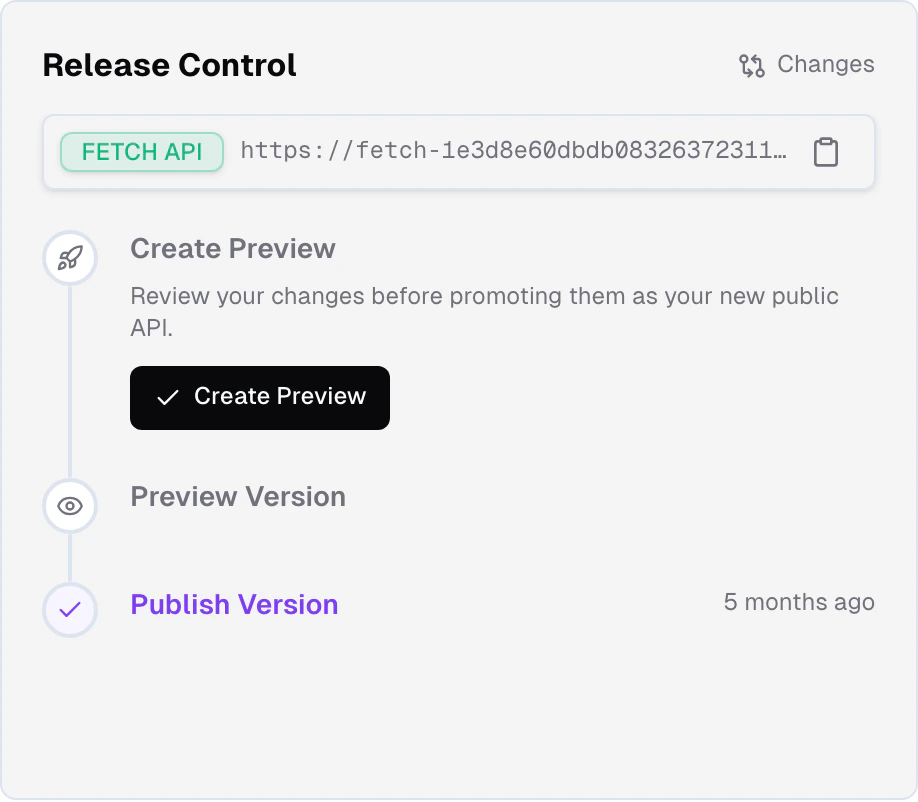
develop at the moment you created it. Subsequent changes to develop don’t affect the preview; you’re testing a stable snapshot.
Test against a preview
A preview is useful only if your frontend can talk to it. That’s what version tokens are for.Regenerate the Client SDK against the preview
From your editor, run The token is baked into the generated client files, not stored in an
env var you have to remember to flip.
frontic generate. The CLI prompts you to pick
which version to target - select preview. The generated SDK embeds
the preview’s version token directly.Run your frontend against the SDK
Your frontend now talks to the preview snapshot instead of
public.
This is the version you QA against - not a moving target, not a
rebase of develop, but a frozen frame of everything.Iterate
If you find issues, fix them in
develop, create a new preview
(overwriting the old one), regenerate the SDK, and test again. Each
iteration gets a fresh snapshot.Promote to public
When the preview passes your tests, open your project’s dashboard and click Promote to Public in Release Control. Promotion is instant. All three version stages -develop, preview, and public - run their own pipelines continuously, so the preview’s records are already up-to-date with the latest feed data at the moment you promote. Nothing needs to re-process; promotion is a pointer flip. Every frontend talking to public starts seeing the new version in the same moment. No downtime, no version skew between callers, no forward-compatibility code to maintain - it’s an atomic swap.
After promotion, the preview slot is empty again and Release Control hides the preview section until you create a new one.
Version tokens
A version token is a short identifier that pins a caller to an exact project snapshot. Frontic uses it on every API call via theFS-Version HTTP header:
Preview token
Points callers at the current preview. Generated when you create a
preview; expires when it’s promoted or overwritten.
Public token
Points callers at the current
public version. Requests without an
FS-Version header land here by default.Develop token
Points callers at the live
develop state - the work-in-progress
version. For active development; not for production traffic.Graceful fallback
The magic of version tokens is what happens when they stop being valid.- Your preview gets promoted
- No token at all
The preview token your SDK was generated with now points at a snapshot
that’s been merged into
public. Instead of erroring, Frontic
silently falls back to public - which, post-promotion, serves
the same content. Your frontend keeps working with zero code changes.Independent deploys
Because version tokens decouple the frontend’s view of the API from which stage that API lives in, you can deploy in either order:- Backend first - create a preview, test it, promote. Your existing frontend (on an older token) still works against the new
publicvia fallback. When you’re ready, ship a frontend update against the new state. - Frontend first - generate an SDK against a preview, deploy the new frontend referencing it. Customers still hit the old
publicuntil you promote. When you promote, the swap is instant.
Rollback
Preview - rollback is on the near-term roadmap. The shape may change before release.
develop, create a new preview, and promote it - the same flow as any other change.
Related
Releases
The version stages, the lifecycle, and the mental model.
What's in a Release
Exactly what a snapshot contains - and what it doesn’t.