

How URLs are generated
A page is how Frontic assigns a URL to content. When you create a page, you pick:- a block - what kind of content does this route render? (A category page, a product page, an article page.)
- a slug field - which field on the block’s record should become the URL slug? (
name,breadcrumbs,handle.)
These are the URLs of the storefront Frontic serves. If you’re linking into a Shopware storefront instead - from an experience embedded in a Shopware layout, say - that address is Shopware’s own, and the Shopware connector imports it as a separate
seoPath field. It doesn’t feed the Page URLs described here.Fetch a page
The frontend doesn’t need a local route table. It takes the incoming URL, asks Frontic, and gets back the block, the data, and the route metadata in one call:type field tells your frontend which component to mount; the data field has the content; the route field has everything you need for SEO, hreflang, and redirect handling.
URL history
The hardest part of commerce URLs isn’t minting them - it’s not breaking them. Products change names. Categories get renamed. Slugs shift because someone fixed a typo. In every one of those cases, the old URL needs to either continue working or redirect to the new one, not 404. Frontic tracks URL history per page automatically, and lets you decide what happens when a slug changes. When you create a page, you configure an Action on withdrawal:302 Redirect to home
The most common choice. Temporary redirect. Use when the content is
gone and you want search engines to keep revisiting.
301 Redirect to home
Permanent redirect. Use when the URL is genuinely retired and should
be removed from search indexes over time.
Delete URL
The URL disappears from the project entirely. Callers get a 404 and
no redirect. Use sparingly.
Keep URL with 404
The URL stays in Frontic’s history but serves a 404 response.
Useful when you want analytics on broken inbound traffic.
URL Browser
Use the URL Browser in the admin app to inspect the URLs Frontic has generated for your project. It lives in the API Builder section next to Blocks, Listings, Pages, and Trees.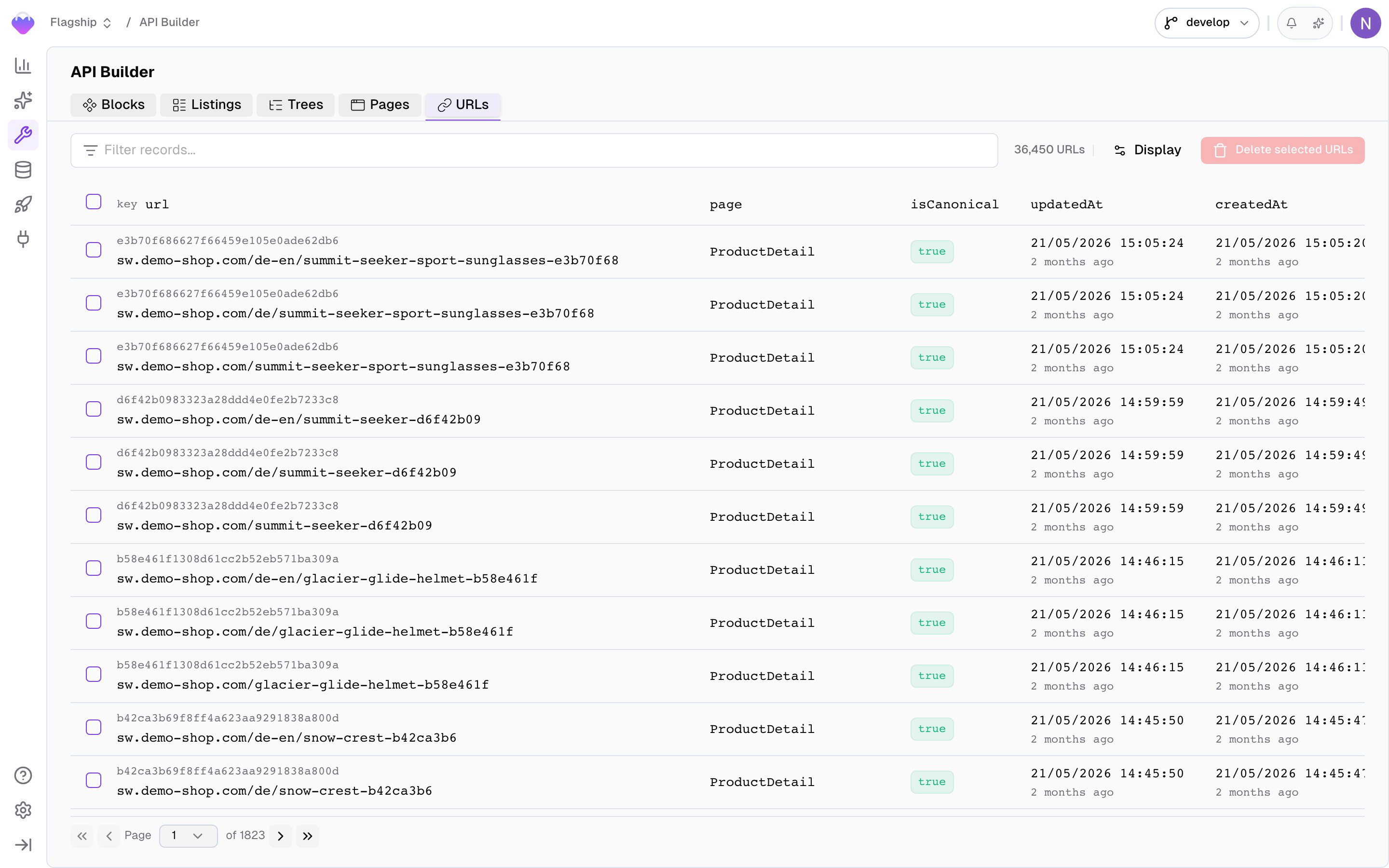
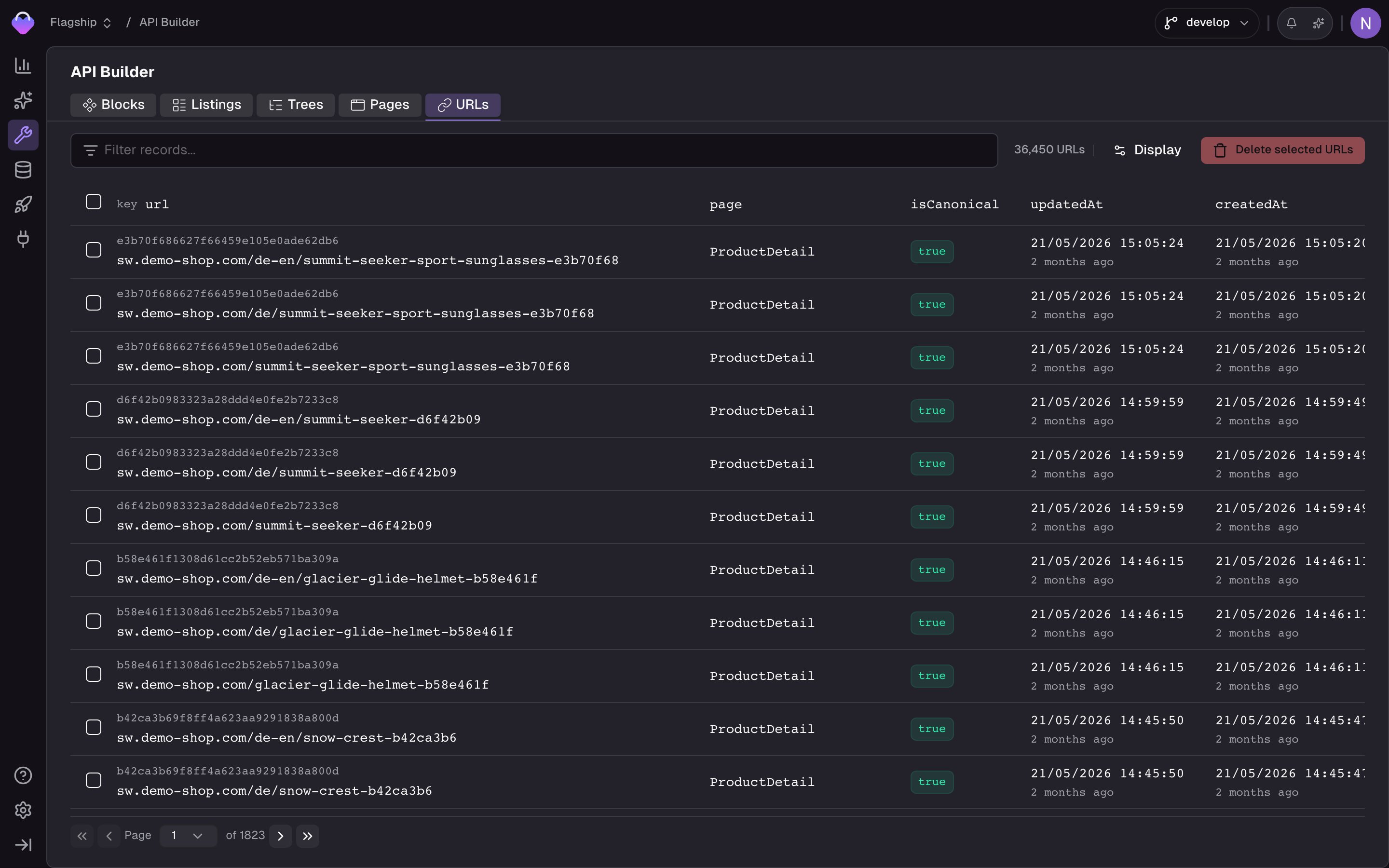
URL Browser - inspect generated page URLs
url, key, page, block, domain, region, locale, isCanonical, pageRecordDeleteStrategy, and timestamps. isCanonical tells you whether the URL is the current active URL for that record; historical URLs are kept for redirects or 404 handling. pageRecordDeleteStrategy mirrors the page’s Action on withdrawal setting.
Use the URL Browser when you need to debug URL generation, verify that localized URLs were created correctly, find which page a given URL resolves to, inspect canonical versus historical URLs, launch the Fetch API playground for a specific URL, or manually remove stale URLs.
Conflict resolution
URLs must be unique. What happens when two products with the same name would generate the same slug? You configure a conflict resolution strategy on the page:
Pick whichever fits your SEO strategy. Append is the usual choice for products; dismiss is sometimes used for low-value content.
Localized URLs
A page in a multi-locale project automatically generates a URL per supported locale, and the response fromclient.page(slug) includes the full alternates list in page.route.alternates:
alternates to:
- render
hreflangtags so Google serves the right language to the right user - build intelligent language switchers that link to the same content in another language, not only to the home page of a different locale
- power browser-language-based suggestions (“we noticed you’re reading in English - want to switch?”)
Context mismatches
If the caller’s context (fromrequestUrl or an access token) doesn’t match the URL they asked for - for example, a de-DE token requesting an /en/... path - Frontic returns a suggested alternate instead of silently serving the wrong content:
context.suggested to prompt the user, auto-redirect, or adjust the canonical tag. The stack never guesses on your behalf.
404s and redirects
When a URL doesn’t resolve, the response still has shape - there’s no special error path, only a differentroute.code:
- 404 Not Found
- 301 Redirect
- 302 Redirect
route.code to set its HTTP response code and route.redirect.href as the location. One code path, all the cases.
SEO metadata
Frontic ships with a built-inSEO composite field type. Add it to your Data Storage schema and you get a structured field for meta title, meta description, keywords, and canonical settings, ready to flow through your blocks into the response.
SEO composite is commerce-aware - it knows about the shapes and constraints of product SEO, category SEO, and content SEO. See Storage Field Types for the full schema.
Because the field is translatable, each locale gets its own SEO values. Because it flows through your blocks, your CategoryDetail or ProductPage block decides which fields of the SEO composite to expose in its response - and your frontend renders them into <head> tags per request.
Related
Page URLs
The full Page URL configuration - slug fields, withdrawal actions,
conflict strategies, menus.
Multi-Channel & Multi-Region
How scopes, regions, and locales shape URL alternates.
Storage Field Types
The
SEO composite and every other built-in field type.