The Akeneo connector syncs your PIM’s product catalog and category tree into Frontic. Akeneo’s product models become parent products, individual products become variants, and the connector pre-resolves attribute values, currencies, and locales - so your Data Sync receives a normalized payload instead of raw PIM structures.
Akeneo product models as parent records, individual products as variants - with attributes, families, and prices pre-resolved.
Categories
Power category pages, attach category context to other records, drive navigation.
The Akeneo connector follows the standard integration model - see how integrations work for Connection, Channels, and Data Feeds. This page covers the Akeneo-specific configuration and data shape.
Your Akeneo instance URL, e.g. https://my-pim.cloud.akeneo.com.
Connect via Connection
Prepare Akeneo Connection
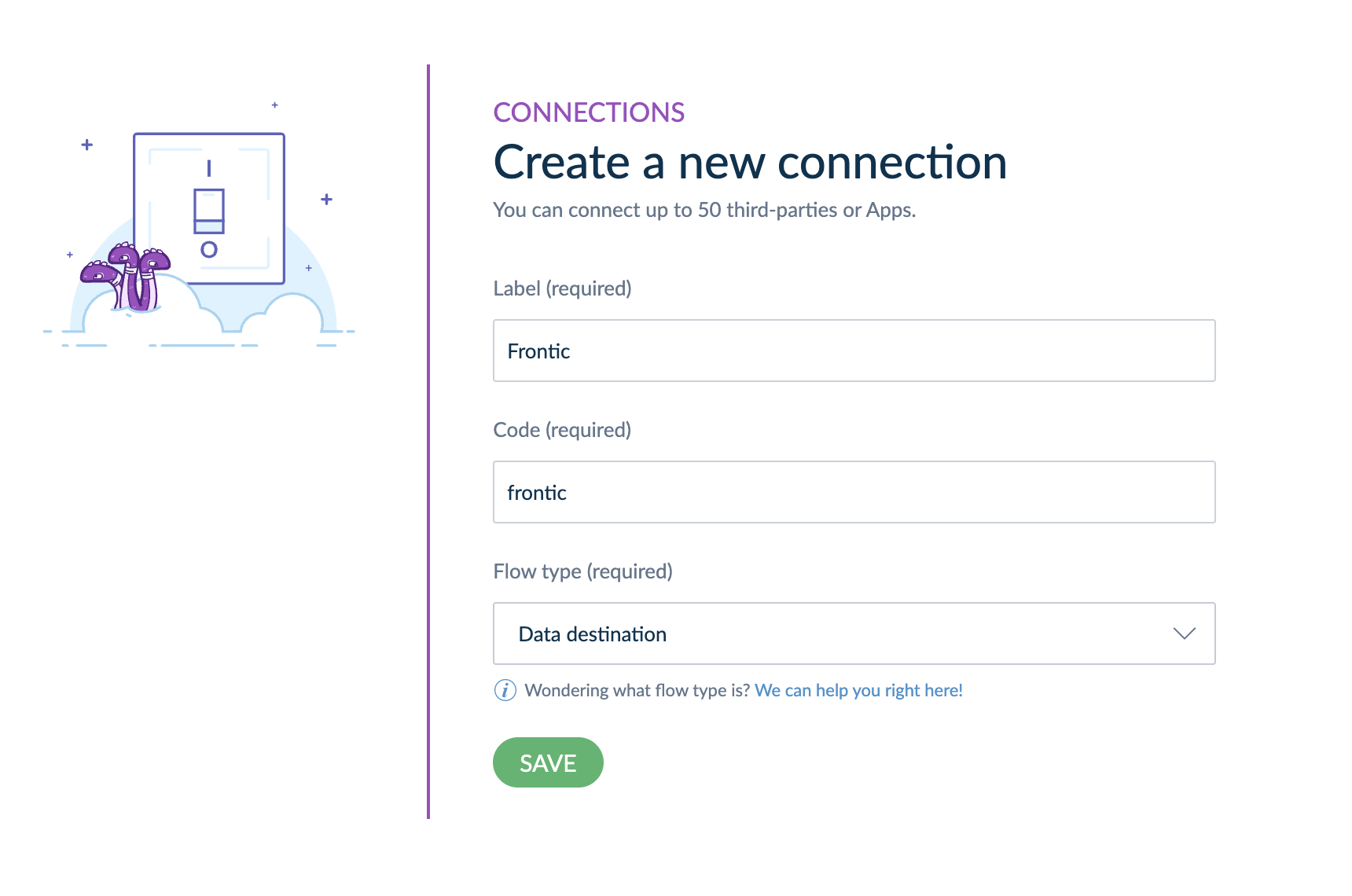
In your Akeneo interface, navigate to Connect → Connection Settings and use the Create button to add a new API connection.Set up the connection like this (especially choosing Data destination as the Flow type):
Frontic admin - Akeneo Connection basic setup information
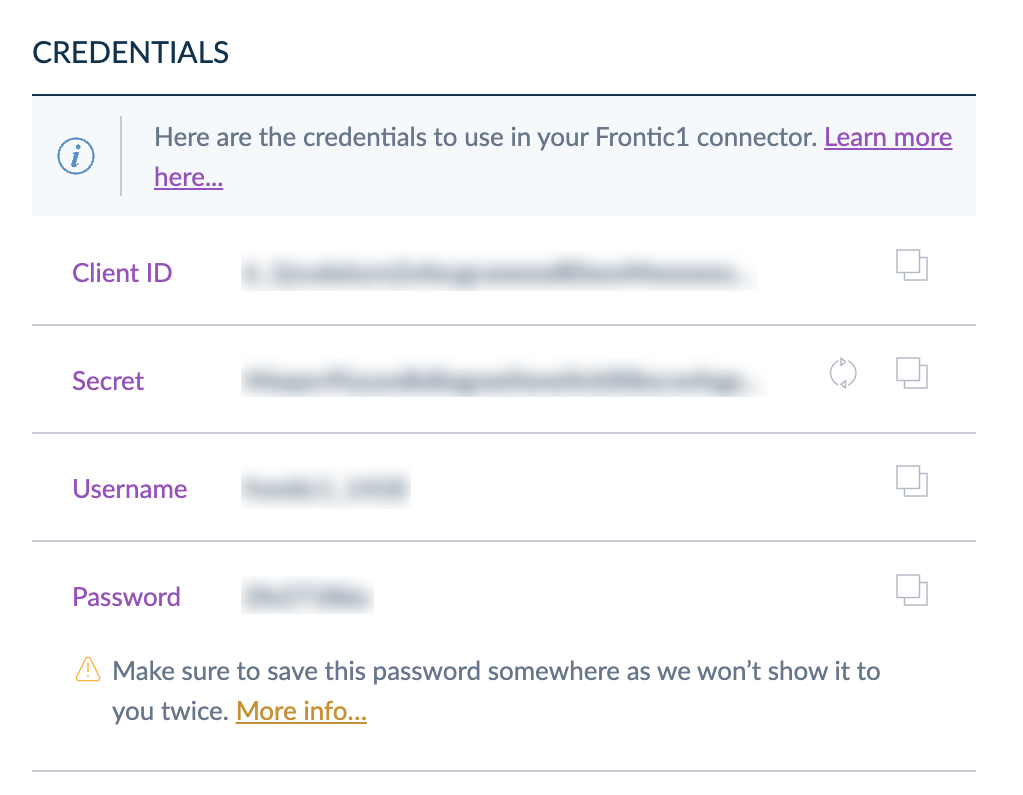
Copy the Connection credentials on the page, you will need them to setup the Frontic integration.
Frontic admin - Akeneo Connection Credentials
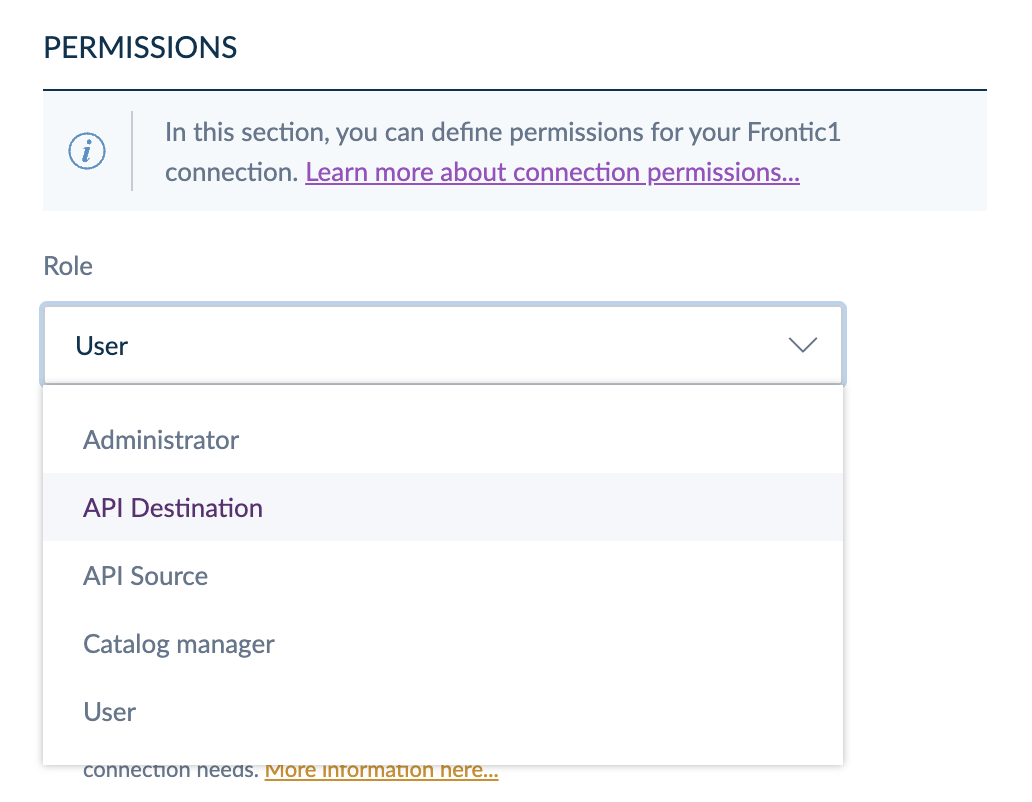
Afterwards, make sure to configure the Akeneo Integration with the role of API Destination.
Frontic admin - Akeneo Connection Permissions
Use this to connect your Akeneo instance via a Connection configuration in Akeneo. Use this if you don’t (or can’t) install the Frontic Akeneo App.
An Akeneo API connection token. Given after installing the Frontic Akeneo App from the Akeneo App Marketplace - Frontic uses this to authenticate against the Akeneo REST API.
Akeneo Enterprise app permissions and locale alignment. On Akeneo Enterprise instances, the connection’s app permissions limit which locales it’s allowed to read. The locale dropdown in Frontic shows all of Akeneo’s enabled locales - not the subset your connection is authorised for. If you pick a locale the connection can’t read, the API rejects the request at sync time and the feed errors mid-run.Before saving the channel, open Connect → Connection settings → Permissions in Akeneo and confirm the connection has at least the same locales selected as the channel will pull. The two lists should match 1:1 - match what’s in Frontic to what the connection is allowed to read, not the other way around.
The connection populates the channel’s currency dropdown from Akeneo’s enabled currencies (with their enabled flag respected).
Akeneo’s identifier field is what Frontic uses as the record key on both sides of the parent/variant divide - for product models, it’s the model code; for individual products, it’s the product identifier (typically the SKU). Treat the SKU as the stable lookup key when configuring blocks, listings, and slugs that point at variant records.
Akeneo’s product models become parent records; the individual products underneath become variants linked via parentId. Standalone products (no model) are emitted twice on purpose - once as a parent and once as a self-referencing variant - so a product with no variants still has a record on each side of the parent/variant divide. Same convention as Shopware and the Custom integration.
Akeneo attributes don’t all play the same role: some define variants (size, colour, material - the things customers pick from), others describe the product (ingredients, dimensions, care instructions). The connector’s attribute extractor splits them apart and stamps each list onto the feed record under the reserved $-prefix namespace:
$options - variant-defining attributes, normalized into a single list per record
$properties - descriptive attributes that don’t drive variant selection
Map either list straight into your storage’s Option and property fields in the Value Composer, instead of re-deriving them from Akeneo’s raw values structures.
Read-only. The Akeneo connector pulls from Akeneo; it doesn’t push back. Catalog edits happen in Akeneo.
Reserved $-prefix keys. The connector emits $options and $properties on every product record. Don’t use $-prefixed keys for your own custom attributes - Frontic reserves that namespace for connector-side normalization.
How Akeneo’s product models and variants compose at the API layer.
commercetools
commercetools’ connector - same $options / $properties split.
{"docsConfig":{"theme":"mint","$schema":"https://mintlify.com/docs.json","name":"Frontic Docs","description":"Frontic - an AI platform for shipping shopping experiences in a fraction of the time, with double the fun.","colors":{"primary":"#a855f7","light":"#c084fc","dark":"#8b5cf6"},"logo":{"light":"https://mintcdn.com/frontic/QEEg-J3fIyHJ_Wyh/logo/logo-light.svg?fit=max\u0026auto=format\u0026n=QEEg-J3fIyHJ_Wyh\u0026q=85\u0026s=36391b9f3546193a73f97d7b6ee40463","dark":"https://mintcdn.com/frontic/QEEg-J3fIyHJ_Wyh/logo/logo-dark.svg?fit=max\u0026auto=format\u0026n=QEEg-J3fIyHJ_Wyh\u0026q=85\u0026s=704f0d073af32f152eab7ab9e4229a9b"},"favicon":"https://mintcdn.com/frontic/QEEg-J3fIyHJ_Wyh/logo/light.svg?fit=max\u0026auto=format\u0026n=QEEg-J3fIyHJ_Wyh\u0026q=85\u0026s=add2ba40542c32e89fccea55bbd2afbd","api":{"playground":{"display":"interactive"},"mdx":{"auth":{"method":"key","name":"Authorization"},"server":"https://ingest-{integration-id}.frontic.com"}},"appearance":{"default":"dark","strict":false},"navbar":{"links":[{"href":"mailto:support@frontic.com","label":"Support"},{"href":"https://www.frontic.com","label":"Website"}],"primary":{"type":"button","label":"Log In","href":"https://app.frontic.com"}},"footer":{"socials":{"github":"https://github.com/frontic","linkedin":"https://www.linkedin.com/company/102853312"},"links":[{"header":"Resources","items":[{"label":"Changelog","href":"https://frontic.com/changelog"},{"label":"Status","href":"https://status.frontic.com"}]},{"header":"Company","items":[{"label":"Website","href":"https://www.frontic.com"},{"label":"Support","href":"mailto:support@frontic.com"}]}]},"search":{"prompt":"Search Frontic docs..."},"styling":{"codeblocks":{"theme":"css-variables"},"latex":false},"integrations":{"posthog":{"apiKey":"phc_4DuVaMwZYdzCq7HW2hyorMIALyLvxWvC2STOIk8z1lr","apiHost":"https://eu.posthog.com"}},"contextual":{"options":["copy","chatgpt","claude","mcp","cursor"],"display":"header"},"navigation":{"global":{},"pages":[]}},"deployment":{"deploymentMetadataValue":{"subdomain":"frontic","hasAudioNarration":false,"actualSubdomain":"frontic","customDomains":["docs.frontic.com"],"gitSource":{"type":"github","owner":"frontic","repo":"docs","deployBranch":"main","isPrivate":true,"contentDirectory":"","mountPath":"","label":""},"chroma":{"liveDeploymentHistoryId":"6ae9d97907405bf5d595f3b7","collectionId":"387cc768-62b3-4d3c-8f23-33a09940f21c","schemaVersion":"v3","latestBuiltDeploymentHistoryId":"6ae9d97907405bf5d595f3b7"},"feedback":{"agentFeedback":true},"entitlements":{},"buildId":"6ae9d97907405bf5d595f3b7","clientVersion":"0.0.4045","searchFilterCounts":[{"language":"default","tag":"Documentation","count":52},{"language":"default","tag":"Connectors","count":26},{"language":"default","tag":"Reference","count":24},{"language":"default","tag":"Fetch API","count":9},{"language":"default","tag":"Build in Frontic","count":8},{"language":"default","tag":"Context Base","count":7},{"language":"default","tag":"Essentials","count":7},{"language":"default","tag":"Project Settings","count":7},{"language":"default","tag":"Ingest API","count":6},{"language":"default","tag":"API Builder","count":5}]},"assistantConfig":{"enableAskAiButton":false,"enableStarterQuestions":false,"enableAskAiSearchBar":true},"basePath":"","hasChatPermissions":false,"hasWebMcpPermissions":false,"toggles":[{"name":"kill-isr","enabled":true,"variant":{"name":"disabled","enabled":false,"feature_enabled":true},"impressionData":false},{"name":"agent-mintlify-slack","enabled":true,"variant":{"name":"disabled","enabled":false,"feature_enabled":true},"impressionData":false},{"name":"agent-integrations-settings","enabled":true,"variant":{"name":"disabled","enabled":false,"feature_enabled":true},"impressionData":false},{"name":"automations-pr-grouping","enabled":true,"variant":{"name":"disabled","enabled":false,"feature_enabled":true},"impressionData":false},{"name":"custom-prefix","enabled":true,"variant":{"name":"disabled","enabled":false,"feature_enabled":true},"impressionData":false},{"name":"analytics-v7","enabled":true,"variant":{"name":"disabled","enabled":false,"feature_enabled":true},"impressionData":false},{"name":"user-flows-analytics","enabled":true,"variant":{"name":"disabled","enabled":false,"feature_enabled":true},"impressionData":false},{"name":"no-publish-flow","enabled":true,"variant":{"name":"disabled","enabled":false,"feature_enabled":true},"impressionData":false},{"name":"workos-onboarding","enabled":true,"variant":{"name":"disabled","enabled":false,"feature_enabled":true},"impressionData":false},{"name":"llms-txt-v2","enabled":true,"variant":{"name":"disabled","enabled":false,"feature_enabled":true},"impressionData":false},{"name":"snapshot-serving-live","enabled":true,"variant":{"name":"disabled","enabled":false,"feature_enabled":true},"impressionData":false},{"name":"stripTemperatureMiddleware","enabled":true,"variant":{"name":"disabled","enabled":false,"feature_enabled":true},"impressionData":false},{"name":"support-platform-pylon-zendesk","enabled":true,"variant":{"name":"disabled","enabled":false,"feature_enabled":true},"impressionData":false},{"name":"snapshot-serving","enabled":true,"variant":{"name":"disabled","enabled":false,"feature_enabled":true},"impressionData":false},{"name":"instant-rollback","enabled":true,"variant":{"name":"disabled","enabled":false,"feature_enabled":true},"impressionData":false},{"name":"granular-notifications-server","enabled":true,"variant":{"name":"disabled","enabled":false,"feature_enabled":true},"impressionData":false},{"name":"granular-notifications","enabled":true,"variant":{"name":"disabled","enabled":false,"feature_enabled":true},"impressionData":false},{"name":"automations-fable","enabled":true,"variant":{"name":"disabled","enabled":false,"feature_enabled":true},"impressionData":false},{"name":"fixed-ai-action-pricing","enabled":true,"variant":{"name":"disabled","enabled":false,"feature_enabled":true},"impressionData":false},{"name":"automation-resolve-merge-conflict","enabled":true,"variant":{"name":"disabled","enabled":false,"feature_enabled":true},"impressionData":false},{"name":"scoped-publishing","enabled":true,"variant":{"name":"disabled","enabled":false,"feature_enabled":true},"impressionData":false},{"name":"mintql","enabled":true,"variant":{"name":"disabled","enabled":false,"feature_enabled":true},"impressionData":false},{"name":"page-level-analytics","enabled":true,"variant":{"name":"disabled","enabled":false,"feature_enabled":true},"impressionData":false},{"name":"editor-version-history-v2","enabled":true,"variant":{"name":"disabled","enabled":false,"feature_enabled":true},"impressionData":false},{"name":"billing-page-v2","enabled":true,"variant":{"name":"disabled","enabled":false,"feature_enabled":true},"impressionData":false},{"name":"full-page-search","enabled":true,"variant":{"name":"disabled","enabled":false,"feature_enabled":true},"impressionData":false},{"name":"workspace-projects","enabled":true,"variant":{"name":"disabled","enabled":false,"feature_enabled":true},"impressionData":false},{"name":"assistant-v5","enabled":true,"variant":{"name":"disabled","enabled":false,"feature_enabled":true},"impressionData":false},{"name":"byok-sep-25","enabled":true,"variant":{"name":"disabled","enabled":false,"feature_enabled":true},"impressionData":false},{"name":"fork-pr-previews","enabled":true,"variant":{"name":"disabled","enabled":false,"feature_enabled":true},"impressionData":false},{"name":"revalidation-jwt","enabled":true,"variant":{"name":"disabled","enabled":false,"feature_enabled":true},"impressionData":false},{"name":"vite-origin","enabled":true,"variant":{"name":"disabled","enabled":false,"feature_enabled":true},"impressionData":false},{"name":"billing-updated-9-15","enabled":true,"variant":{"name":"disabled","enabled":false,"feature_enabled":true},"impressionData":false},{"name":"workos-sso-scim","enabled":true,"variant":{"name":"disabled","enabled":false,"feature_enabled":true},"impressionData":false},{"name":"hobby-abuse-scan","enabled":true,"variant":{"name":"disabled","enabled":false,"feature_enabled":true},"impressionData":false},{"name":"dashboard-inbox","enabled":true,"variant":{"name":"disabled","enabled":false,"feature_enabled":true},"impressionData":false},{"name":"workos-signup","enabled":true,"variant":{"name":"disabled","enabled":false,"feature_enabled":true},"impressionData":false},{"name":"turbopuffer-dual-write","enabled":true,"variant":{"name":"disabled","enabled":false,"feature_enabled":true},"impressionData":false},{"name":"workos-enabled","enabled":true,"variant":{"name":"disabled","enabled":false,"feature_enabled":true},"impressionData":false},{"name":"approve-review-flow","enabled":true,"variant":{"name":"disabled","enabled":false,"feature_enabled":true},"impressionData":false},{"name":"sso-setup-deadline-banner","enabled":true,"variant":{"name":"disabled","enabled":false,"feature_enabled":true},"impressionData":false}],"googleFontsInlined":false},"customCss":[{"filePath":"style.css","content":"@keyframes glow-float-1{0%,to{transform:translate(0,0) scale(1)}50%{transform:translate(30px,20px) scale(1.1)}}@keyframes glow-float-2{0%,to{transform:translate(0,0) scale(1)}50%{transform:translate(-20px,30px) scale(1.15)}}@keyframes glow-float-3{0%,to{transform:translate(0,0) scale(1)}50%{transform:translate(20px,-20px) scale(1.05)}}:root{--frontic-purple:#a042ff;--frontic-purple-secondary:#784dcb;--frontic-purple-light:#c084fc;--frontic-violet:#8b5cf6;--frontic-dark-bg:#131117}html.dark{background:#0a0a0f}html.dark body{background:0 0}html.dark body::after,html.dark body::before,html.dark::before{content:\"\";position:fixed;border-radius:50%;filter:blur(112px);opacity:.5;pointer-events:none;z-index:-1}html.dark body::before{top:-10%;left:10%;width:600px;height:600px;background:radial-gradient(circle,rgba(160,66,255,.4) 0,transparent 70%);animation:glow-float-1 8s ease-in-out infinite}html.dark body::after{top:30%;right:5%;width:500px;height:500px;background:radial-gradient(circle,rgba(120,77,203,.35) 0,transparent 70%);animation:glow-float-2 10s ease-in-out infinite}html.dark::before{bottom:10%;left:30%;width:400px;height:400px;background:radial-gradient(circle,rgba(168,85,247,.25) 0,transparent 70%);animation:glow-float-3 9s ease-in-out infinite}html:not(.dark){background:#fafafa;--mint-background:#faf5ff;--mint-foreground:#111827;--mint-color-text:#111827;--mint-color-background:#faf5ff;--mint-token-constant:#7c3aed;--mint-token-string:#059669;--mint-token-comment:#9ca3af;--mint-token-keyword:#a855f7;--mint-token-parameter:#6366f1;--mint-token-function:#8b5cf6;--mint-token-string-expression:#059669;--mint-token-punctuation:#6b7280;--mint-token-link:#a855f7}html:not(.dark) body{background:0 0}html:not(.dark) body::after,html:not(.dark) body::before{content:\"\";position:fixed;border-radius:50%;filter:blur(100px);pointer-events:none;z-index:-1}html:not(.dark) body::before{top:-10%;left:10%;width:600px;height:600px;background:radial-gradient(circle,rgba(160,66,255,.15) 0,transparent 70%);animation:glow-float-1 8s ease-in-out infinite}html:not(.dark) body::after{top:40%;right:5%;width:500px;height:500px;background:radial-gradient(circle,rgba(120,77,203,.12) 0,transparent 70%);animation:glow-float-2 10s ease-in-out infinite}.prose,[class*=content],body,main,nav:not([class*=top]){background:0 0!important}html.dark #sidebar{background:linear-gradient(180deg,rgba(160,66,255,.03) 0,transparent 100%)!important}#sidebar,#sidebar-content{box-shadow:none!important}html.dark header,html.dark nav{border-bottom-color:rgba(160,66,255,.1)!important}html.dark .code-group{border-top:1px solid rgba(160,66,255,.15)!important;border-radius:8px!important}html:not(.dark) .code-group{border:1px solid rgba(160,66,255,.1)!important;border-radius:8px!important;background-color:#faf5ff!important;color:#111827!important}pre{border:0!important}html.dark{--mint-background:#1a1625;--mint-foreground:#e5e7eb;--mint-color-text:#e5e7eb;--mint-color-background:#1a1625;--mint-token-constant:#c4b5fd;--mint-token-string:#6ee7b7;--mint-token-comment:#6b7280;--mint-token-keyword:#c084fc;--mint-token-parameter:#a5b4fc;--mint-token-function:#a78bfa;--mint-token-string-expression:#6ee7b7;--mint-token-punctuation:#9ca3af;--mint-token-link:#c084fc}html:not(.dark) :not(pre)>code{background-color:rgba(160,66,255,.08)!important;color:#6b21a8!important}html:not(.dark) .code-group [role=tab][aria-selected=true],html:not(.dark) .codeblock-dark [role=tab][aria-selected=true],html:not(.dark) button[aria-label*=opy] svg{color:#7c3aed!important}html:not(.dark) .code-group [role=tab]{color:#6b7280!important}html:not(.dark) .code-group [role=tab]:hover>div:first-child{background-color:rgba(160,66,255,.1)!important;color:#7c3aed!important}html:not(.dark) .code-group [role=tab][aria-selected=true]>div:last-child{background-color:#7c3aed!important}html:not(.dark) .codeblock-dark,html:not(.dark) .codeblock-dark [data-component-part=code-block-root]{background-color:#faf5ff!important;color:#111827!important}html:not(.dark) .codeblock-dark [data-fade-overlay=true]{--fade-color-light:#faf5ff!important;--fade-color-dark:#faf5ff!important}[role=listbox],[role=menu],[role=tooltip]{background-color:#fff!important;color:#1f2937!important;border:1px solid rgba(160,66,255,.15);border-radius:8px;box-shadow:0 12px 28px -8px rgba(0,0,0,.18);backdrop-filter:blur(8px)}html.dark [role=listbox],html.dark [role=menu],html.dark [role=tooltip]{background-color:#1a1625!important;color:#e5e7eb!important;border-color:rgba(160,66,255,.25);box-shadow:0 12px 28px -8px rgba(0,0,0,.6)}[role=tooltip] *{color:inherit!important}[class*=navbar]::after,[class*=sidebar]::after,[class*=sidebar]::before,[class*=topbar]::after,header::after,nav[class*=side]::after,nav[class*=side]::before,nav[class*=top]::after{background:0 0!important;background-image:none!important;background-color:transparent!important;display:none!important}[class*=sidebar]>div:first-child{background:0 0!important;background-color:transparent!important;background-image:none!important}#sidebar-content .sticky.top-0{background:0 0!important;background-image:none!important;background-color:transparent!important}[data-nav-tag=Preview]{color:#2563eb!important;background-color:rgba(37,99,235,.1)!important}html.dark [data-nav-tag=Preview]{color:#60a5fa!important;background-color:rgba(96,165,250,.15)!important}[data-nav-tag=New]{color:#16a34a!important;background-color:rgba(22,163,74,.1)!important}html.dark [data-nav-tag=New]{color:#4ade80!important;background-color:rgba(74,222,128,.15)!important}"}],"page":{"pagePath":"connectors/akeneo","slug":"/connectors/akeneo","pageMetadata":{"title":"Akeneo","icon":"database","description":null,"href":"/connectors/akeneo"},"pageType":"default","mdx":{"mdxSource":{"compiledSource":"\"use strict\";const{Fragment:_Fragment,jsx:_jsx,jsxs:_jsxs}=arguments[0];const{useMDXComponents:_provideComponents}=arguments[0];function _createMdxContent(props){const _components={a:`a`,code:`code`,em:`em`,li:`li`,p:`p`,strong:`strong`,tbody:`tbody`,td:`td`,th:`th`,thead:`thead`,tr:`tr`,ul:`ul`,..._provideComponents(),...props.components},{Accordion,AccordionGroup,Card,CardGroup,Frame,Heading,Icon,Info,OptimizedImage,ParamField,Table,Warning}=_components;if(!Accordion)_missingMdxReference(`Accordion`,true);if(!AccordionGroup)_missingMdxReference(`AccordionGroup`,true);if(!Card)_missingMdxReference(`Card`,true);if(!CardGroup)_missingMdxReference(`CardGroup`,true);if(!Frame)_missingMdxReference(`Frame`,true);if(!Heading)_missingMdxReference(`Heading`,true);if(!Icon)_missingMdxReference(`Icon`,true);if(!Info)_missingMdxReference(`Info`,true);if(!OptimizedImage)_missingMdxReference(`OptimizedImage`,true);if(!ParamField)_missingMdxReference(`ParamField`,true);if(!Table)_missingMdxReference(`Table`,true);if(!Warning)_missingMdxReference(`Warning`,true);return _jsxs(_Fragment,{children:[_jsxs(`div`,{style:{display:`flex`,gap:`1.75rem`,alignItems:`flex-start`,marginTop:`0.5rem`,marginBottom:`1.75rem`},children:[_jsx(OptimizedImage,{src:`https://mintcdn.com/frontic/zwqcoY8MRIYLLSYv/images/connectors/akeneo.png?fit=max\u0026auto=format\u0026n=zwqcoY8MRIYLLSYv\u0026q=85\u0026s=1d12ade1ab15f1717a6a669f09481f1e`,alt:`Akeneo`,style:{height:`56px`,width:`auto`,flexShrink:0,marginTop:`0.25rem`},\"data-og-width\":`128`,width:`128`,\"data-og-height\":`128`,height:`128`,\"data-path\":`images/connectors/akeneo.png`,\"data-optimize\":`true`,\"data-opv\":`3`,srcset:`https://mintcdn.com/frontic/zwqcoY8MRIYLLSYv/images/connectors/akeneo.png?w=280\u0026fit=max\u0026auto=format\u0026n=zwqcoY8MRIYLLSYv\u0026q=85\u0026s=d43f2f87f82b6f1cc6bb5593e1b7b8ee 280w, https://mintcdn.com/frontic/zwqcoY8MRIYLLSYv/images/connectors/akeneo.png?w=560\u0026fit=max\u0026auto=format\u0026n=zwqcoY8MRIYLLSYv\u0026q=85\u0026s=570b109d054e28b8438b50b257ab09d3 560w, https://mintcdn.com/frontic/zwqcoY8MRIYLLSYv/images/connectors/akeneo.png?w=840\u0026fit=max\u0026auto=format\u0026n=zwqcoY8MRIYLLSYv\u0026q=85\u0026s=84dbcbd73fb2528fd760c6d0546380ea 840w, https://mintcdn.com/frontic/zwqcoY8MRIYLLSYv/images/connectors/akeneo.png?w=1100\u0026fit=max\u0026auto=format\u0026n=zwqcoY8MRIYLLSYv\u0026q=85\u0026s=903e3066db32155d17c5ea4adbfd58d8 1100w, https://mintcdn.com/frontic/zwqcoY8MRIYLLSYv/images/connectors/akeneo.png?w=1650\u0026fit=max\u0026auto=format\u0026n=zwqcoY8MRIYLLSYv\u0026q=85\u0026s=f818083cdd3d73f2931fc3634e528a9d 1650w, https://mintcdn.com/frontic/zwqcoY8MRIYLLSYv/images/connectors/akeneo.png?w=2500\u0026fit=max\u0026auto=format\u0026n=zwqcoY8MRIYLLSYv\u0026q=85\u0026s=21038e6b83bff83127562cef85476323 2500w`}),_jsx(`div`,{children:_jsx(_components.p,{children:`The Akeneo connector syncs your PIM’s product catalog and category tree into Frontic. Akeneo’s product models become parent products, individual products become variants, and the connector pre-resolves attribute values, currencies, and locales - so your Data Sync receives a normalized payload instead of raw PIM structures.`})})]}),`\n`,_jsxs(`div`,{style:{display:`grid`,gridTemplateColumns:`repeat(3, 1fr)`,gap:`0.75rem`,marginBottom:`2rem`},children:[_jsxs(`div`,{style:{padding:`0.75rem 1rem`,border:`1px solid var(--card-border, rgba(0,0,0,0.08))`,borderRadius:`0.625rem`},children:[_jsx(`div`,{style:{display:`flex`,alignItems:`center`,gap:`0.5rem`,fontSize:`0.75rem`,textTransform:`uppercase`,letterSpacing:`0.04em`,opacity:.6,marginBottom:`0.25rem`},children:_jsxs(_components.p,{children:[_jsx(Icon,{icon:`key`,iconType:`solid`}),` Auth`]})}),_jsx(`div`,{style:{fontSize:`0.875rem`,fontWeight:500},children:`Token`})]}),_jsxs(`div`,{style:{padding:`0.75rem 1rem`,border:`1px solid var(--card-border, rgba(0,0,0,0.08))`,borderRadius:`0.625rem`},children:[_jsx(`div`,{style:{display:`flex`,alignItems:`center`,gap:`0.5rem`,fontSize:`0.75rem`,textTransform:`uppercase`,letterSpacing:`0.04em`,opacity:.6,marginBottom:`0.25rem`},children:_jsxs(_components.p,{children:[_jsx(Icon,{icon:`arrows-rotate`,iconType:`solid`}),` Update methods`]})}),_jsx(`div`,{style:{fontSize:`0.875rem`,fontWeight:500},children:`Trigger · Polling`})]}),_jsxs(`div`,{style:{padding:`0.75rem 1rem`,border:`1px solid var(--card-border, rgba(0,0,0,0.08))`,borderRadius:`0.625rem`},children:[_jsx(`div`,{style:{display:`flex`,alignItems:`center`,gap:`0.5rem`,fontSize:`0.75rem`,textTransform:`uppercase`,letterSpacing:`0.04em`,opacity:.6,marginBottom:`0.25rem`},children:_jsxs(_components.p,{children:[_jsx(Icon,{icon:`boxes-stacked`,iconType:`solid`}),` Resources`]})}),_jsx(`div`,{style:{fontSize:`0.875rem`,fontWeight:500},children:`Products, Categories`})]})]}),`\n`,_jsx(Heading,{level:`2`,id:`what-you-get`,children:`What you get`}),`\n`,_jsxs(CardGroup,{cols:2,children:[_jsx(Card,{title:`Products`,icon:`boxes-stacked`,children:_jsx(_components.p,{children:`Akeneo product models as parent records, individual products as variants - with attributes, families, and prices pre-resolved.`})}),_jsx(Card,{title:`Categories`,icon:`folder-tree`,children:_jsx(_components.p,{children:`Power category pages, attach category context to other records, drive navigation.`})})]}),`\n`,_jsxs(_components.p,{children:[`The Akeneo connector follows the standard integration model - see `,_jsx(_components.a,{href:`/connectors/overview`,children:`how integrations work`}),` for Connection, Channels, and Data Feeds. This page covers the Akeneo-specific configuration and data shape.`]}),`\n`,_jsx(Heading,{level:`2`,id:`connection-settings`,children:`Connection settings`}),`\n`,_jsx(ParamField,{path:`Base URL`,type:`string`,required:true,id:`param-base-url`,children:_jsxs(_components.p,{children:[`Your Akeneo instance URL, e.g. `,_jsx(_components.code,{children:`https://my-pim.cloud.akeneo.com`}),`.`]})}),`\n`,_jsxs(AccordionGroup,{children:[_jsxs(Accordion,{title:`Connect via Connection`,id:`connect-via-connection`,children:[_jsxs(Accordion,{title:`Prepare Akeneo Connection`,id:`prepare-akeneo-connection`,children:[_jsxs(_components.p,{children:[`In your Akeneo interface, navigate to `,_jsx(_components.strong,{children:`Connect → Connection Settings`}),` and use the `,_jsx(_components.strong,{children:`Create`}),` button to add a new API connection.`]}),_jsxs(_components.p,{children:[`Set up the connection like this (especially choosing `,_jsx(_components.strong,{children:`Data destination`}),` as the `,_jsx(_components.strong,{children:`Flow type`}),`):`]}),_jsx(Frame,{caption:`Frontic admin - Akeneo Connection basic setup information`,children:_jsx(OptimizedImage,{src:`https://mintcdn.com/frontic/yWvj-NXYgCP3ESsq/images/connectors/akeneo/connection-setup.png?fit=max\u0026auto=format\u0026n=yWvj-NXYgCP3ESsq\u0026q=85\u0026s=06a621999b3b51faa0022509aa785c98`,className:`mint-block`,alt:`Akeneo Connection basic setup information`,\"data-og-width\":`1720`,width:`1720`,\"data-og-height\":`1140`,height:`1140`,\"data-path\":`images/connectors/akeneo/connection-setup.png`,\"data-optimize\":`true`,\"data-opv\":`3`,srcset:`https://mintcdn.com/frontic/yWvj-NXYgCP3ESsq/images/connectors/akeneo/connection-setup.png?w=280\u0026fit=max\u0026auto=format\u0026n=yWvj-NXYgCP3ESsq\u0026q=85\u0026s=6e98569bb377374f1829666e51522d2b 280w, https://mintcdn.com/frontic/yWvj-NXYgCP3ESsq/images/connectors/akeneo/connection-setup.png?w=560\u0026fit=max\u0026auto=format\u0026n=yWvj-NXYgCP3ESsq\u0026q=85\u0026s=163eb677f659aca1025610f3a71fa581 560w, https://mintcdn.com/frontic/yWvj-NXYgCP3ESsq/images/connectors/akeneo/connection-setup.png?w=840\u0026fit=max\u0026auto=format\u0026n=yWvj-NXYgCP3ESsq\u0026q=85\u0026s=ea361d4624ad7fecdcf00a9ca3402a08 840w, https://mintcdn.com/frontic/yWvj-NXYgCP3ESsq/images/connectors/akeneo/connection-setup.png?w=1100\u0026fit=max\u0026auto=format\u0026n=yWvj-NXYgCP3ESsq\u0026q=85\u0026s=d2a64322daddbd7f4fc6b23161cd1f1b 1100w, https://mintcdn.com/frontic/yWvj-NXYgCP3ESsq/images/connectors/akeneo/connection-setup.png?w=1650\u0026fit=max\u0026auto=format\u0026n=yWvj-NXYgCP3ESsq\u0026q=85\u0026s=428441101660fb5c932fe2ee803179a2 1650w, https://mintcdn.com/frontic/yWvj-NXYgCP3ESsq/images/connectors/akeneo/connection-setup.png?w=2500\u0026fit=max\u0026auto=format\u0026n=yWvj-NXYgCP3ESsq\u0026q=85\u0026s=19d3185271fefab6627c819fc6579430 2500w`})}),_jsx(_components.p,{children:`Copy the Connection credentials on the page, you will need them to setup the Frontic integration.`}),_jsx(Frame,{caption:`Frontic admin - Akeneo Connection Credentials`,children:_jsx(OptimizedImage,{src:`https://mintcdn.com/frontic/yWvj-NXYgCP3ESsq/images/connectors/akeneo/credentials.png?fit=max\u0026auto=format\u0026n=yWvj-NXYgCP3ESsq\u0026q=85\u0026s=76309c53d44fffdb4a37d123d66bb219`,className:`mint-block`,alt:`Akeneo Connection Credentials`,\"data-og-width\":`1023`,width:`1023`,\"data-og-height\":`795`,height:`795`,\"data-path\":`images/connectors/akeneo/credentials.png`,\"data-optimize\":`true`,\"data-opv\":`3`,srcset:`https://mintcdn.com/frontic/yWvj-NXYgCP3ESsq/images/connectors/akeneo/credentials.png?w=280\u0026fit=max\u0026auto=format\u0026n=yWvj-NXYgCP3ESsq\u0026q=85\u0026s=32831c3f99b477e1be531a140431842b 280w, https://mintcdn.com/frontic/yWvj-NXYgCP3ESsq/images/connectors/akeneo/credentials.png?w=560\u0026fit=max\u0026auto=format\u0026n=yWvj-NXYgCP3ESsq\u0026q=85\u0026s=83d84a8d2866cfdd2cfb783a5489600f 560w, https://mintcdn.com/frontic/yWvj-NXYgCP3ESsq/images/connectors/akeneo/credentials.png?w=840\u0026fit=max\u0026auto=format\u0026n=yWvj-NXYgCP3ESsq\u0026q=85\u0026s=29f257f72dad9f048a15674472e31f25 840w, https://mintcdn.com/frontic/yWvj-NXYgCP3ESsq/images/connectors/akeneo/credentials.png?w=1100\u0026fit=max\u0026auto=format\u0026n=yWvj-NXYgCP3ESsq\u0026q=85\u0026s=259d10316cdac037dd6dd627e878fa93 1100w, https://mintcdn.com/frontic/yWvj-NXYgCP3ESsq/images/connectors/akeneo/credentials.png?w=1650\u0026fit=max\u0026auto=format\u0026n=yWvj-NXYgCP3ESsq\u0026q=85\u0026s=5a537939b808e37d47c502f9c895a3d2 1650w, https://mintcdn.com/frontic/yWvj-NXYgCP3ESsq/images/connectors/akeneo/credentials.png?w=2500\u0026fit=max\u0026auto=format\u0026n=yWvj-NXYgCP3ESsq\u0026q=85\u0026s=c7b90f84f11c411eb97b9d91e31dc60b 2500w`})}),_jsxs(_components.p,{children:[`Afterwards, make sure to configure the Akeneo Integration with the role of `,_jsx(_components.strong,{children:`API Destination`}),`.`]}),_jsx(Frame,{caption:`Frontic admin - Akeneo Connection Permissions`,children:_jsx(OptimizedImage,{src:`https://mintcdn.com/frontic/yWvj-NXYgCP3ESsq/images/connectors/akeneo/permissions.png?fit=max\u0026auto=format\u0026n=yWvj-NXYgCP3ESsq\u0026q=85\u0026s=e8aacb9a7ec98a883142af5b933abde0`,className:`mint-block`,alt:`Akeneo Connection Permissions`,\"data-og-width\":`1032`,width:`1032`,\"data-og-height\":`802`,height:`802`,\"data-path\":`images/connectors/akeneo/permissions.png`,\"data-optimize\":`true`,\"data-opv\":`3`,srcset:`https://mintcdn.com/frontic/yWvj-NXYgCP3ESsq/images/connectors/akeneo/permissions.png?w=280\u0026fit=max\u0026auto=format\u0026n=yWvj-NXYgCP3ESsq\u0026q=85\u0026s=5ba94b55e7a13aa43e3d0c22ec0e761e 280w, https://mintcdn.com/frontic/yWvj-NXYgCP3ESsq/images/connectors/akeneo/permissions.png?w=560\u0026fit=max\u0026auto=format\u0026n=yWvj-NXYgCP3ESsq\u0026q=85\u0026s=bce0cd6594210c48d0c6539d59d80116 560w, https://mintcdn.com/frontic/yWvj-NXYgCP3ESsq/images/connectors/akeneo/permissions.png?w=840\u0026fit=max\u0026auto=format\u0026n=yWvj-NXYgCP3ESsq\u0026q=85\u0026s=615fb74d23c2e1d02fa4a3fdf0a4d86b 840w, https://mintcdn.com/frontic/yWvj-NXYgCP3ESsq/images/connectors/akeneo/permissions.png?w=1100\u0026fit=max\u0026auto=format\u0026n=yWvj-NXYgCP3ESsq\u0026q=85\u0026s=94ea0b6951b114495f2b82323a11bb2e 1100w, https://mintcdn.com/frontic/yWvj-NXYgCP3ESsq/images/connectors/akeneo/permissions.png?w=1650\u0026fit=max\u0026auto=format\u0026n=yWvj-NXYgCP3ESsq\u0026q=85\u0026s=24c1eb0d75a9859afcabc6ca6606b03e 1650w, https://mintcdn.com/frontic/yWvj-NXYgCP3ESsq/images/connectors/akeneo/permissions.png?w=2500\u0026fit=max\u0026auto=format\u0026n=yWvj-NXYgCP3ESsq\u0026q=85\u0026s=00f9f29c610feaf753998bb04f3ea6e7 2500w`})})]}),_jsx(_components.p,{children:`Use this to connect your Akeneo instance via a Connection configuration in Akeneo. Use this if you don’t (or can’t) install the Frontic Akeneo App.`}),_jsx(ParamField,{path:`Client ID`,type:`string`,required:true,id:`param-client-id`,children:_jsx(_components.p,{children:`The Akeneo Connection’s Client ID given in the Akeneo configuration.`})}),_jsx(ParamField,{path:`Client Secret`,type:`string`,required:true,id:`param-client-secret`,children:_jsx(_components.p,{children:`The Akeneo Connection’s Client Secret given in the Akeneo configuration.`})}),_jsx(ParamField,{path:`Username`,type:`string`,required:true,id:`param-username`,children:_jsx(_components.p,{children:`The Akeneo Connection’s username given in the Akeneo configuration.`})}),_jsx(ParamField,{path:`Password`,type:`string`,required:true,id:`param-password`,children:_jsx(_components.p,{children:`The Akeneo Connection’s password given in the Akeneo configuration.`})})]}),_jsxs(Accordion,{title:`Connect via App (not yet available)`,id:`connect-via-app-not-yet-available`,children:[_jsx(Info,{children:`The Akeneo App for Frontic is not yet available`}),_jsx(_components.p,{children:`Use this to use your Akeneo instance’s installation of the Frontic Akeneo App.`}),_jsx(ParamField,{path:`Token ID`,type:`string`,required:true,id:`param-token-id`,children:_jsx(_components.p,{children:`An Akeneo API connection token. Given after installing the Frontic Akeneo App from the Akeneo App Marketplace - Frontic uses this to authenticate against the Akeneo REST API.`})}),_jsxs(Warning,{children:[_jsxs(_components.p,{children:[_jsx(_components.strong,{children:`Akeneo Enterprise app permissions and locale alignment.`}),` On Akeneo Enterprise instances, the connection’s app permissions limit which locales it’s allowed to read. The locale dropdown in Frontic shows `,_jsx(_components.em,{children:`all`}),` of Akeneo’s enabled locales - not the subset your connection is authorised for. If you pick a locale the connection can’t read, the API rejects the request at sync time and the feed errors mid-run.`]}),_jsxs(_components.p,{children:[`Before saving the channel, open `,_jsx(_components.strong,{children:`Connect → Connection settings → Permissions`}),` in Akeneo and confirm the connection has at least the same locales selected as the channel will pull. The two lists should match 1:1 - match what’s in Frontic to what the connection is allowed to read, not the other way around.`]})]})]})]}),`\n`,_jsxs(_components.p,{children:[`The connection populates the channel’s currency dropdown from Akeneo’s enabled currencies (with their `,_jsx(_components.code,{children:`enabled`}),` flag respected).`]}),`\n`,_jsx(Heading,{level:`2`,id:`channels`,children:`Channels`}),`\n`,_jsx(_components.p,{children:`An Akeneo channel in Frontic carries the locales (Akeneo “locale codes”) and currencies the connector pulls per record.`}),`\n`,_jsx(ParamField,{path:`Channel Name`,type:`string`,required:true,id:`param-channel-name`,children:_jsx(_components.p,{children:`A label for the channel in Frontic.`})}),`\n`,_jsx(ParamField,{path:`Available Translations`,type:`multiselect`,required:true,id:`param-available-translations`,children:_jsx(_components.p,{children:`Akeneo locale codes the connector pulls per record.`})}),`\n`,_jsx(ParamField,{path:`Fallback Translation`,type:`select`,required:true,id:`param-fallback-translation`,children:_jsx(_components.p,{children:`The translation used when a value is missing in another locale.`})}),`\n`,_jsx(ParamField,{path:`Currencies`,type:`multiselect`,required:true,id:`param-currencies`,children:_jsx(_components.p,{children:`Currencies (from Akeneo’s enabled set) the connector pulls. Product prices are pre-filtered to these.`})}),`\n`,_jsxs(_components.p,{children:[`The `,_jsx(_components.strong,{children:`Refresh`}),` button re-fetches Akeneo’s enabled currencies and locales - use it after enabling new ones in Akeneo.`]}),`\n`,_jsx(Heading,{level:`2`,id:`data-feeds`,children:`Data Feeds`}),`\n`,_jsx(_components.p,{children:`The Akeneo connector exposes two feed types:`}),`\n`,_jsxs(Table,{children:[_jsx(_components.thead,{children:_jsxs(_components.tr,{children:[_jsx(_components.th,{children:`Feed`}),_jsx(_components.th,{children:`What it pulls`})]})}),_jsxs(_components.tbody,{children:[_jsxs(_components.tr,{children:[_jsx(_components.td,{children:_jsx(_components.strong,{children:`Products`})}),_jsx(_components.td,{children:`Akeneo product models (as parents) and individual products (as variants), with their families, attributes, prices, and translations resolved.`})]}),_jsxs(_components.tr,{children:[_jsx(_components.td,{children:_jsx(_components.strong,{children:`Categories`})}),_jsx(_components.td,{children:`The full category tree, parent links preserved.`})]})]})]}),`\n`,_jsxs(_components.p,{children:[`The standard `,_jsx(_components.strong,{children:`Settings → Updates → Schema`}),` setup wizard applies - see `,_jsx(_components.a,{href:`/connectors/overview#data-feeds`,children:`Data Feeds in the overview`}),`. For Akeneo specifically:`]}),`\n`,_jsxs(_components.ul,{children:[`\n`,_jsxs(_components.li,{children:[_jsx(_components.strong,{children:`Updates step`}),` - Polling is supported. The Ingest API and Triggers are not used.`]}),`\n`,_jsxs(_components.li,{children:[_jsx(_components.strong,{children:`Manual refresh`}),` - every Akeneo feed exposes a Refresh action that re-runs the feed against the source.`]}),`\n`]}),`\n`,_jsx(Heading,{level:`3`,id:`product-feed`,children:`Product Feed`}),`\n`,_jsx(_components.p,{children:`For a product feed, you can optionally set an attribute to be used for your products’ prices.`}),`\n`,_jsx(ParamField,{path:`Price Attribute Code`,type:`select`,id:`param-price-attribute-code`,children:_jsx(_components.p,{children:`The attribute which contains the product sale price`})}),`\n`,_jsx(Heading,{level:`2`,id:`what-the-data-looks-like`,children:`What the data looks like`}),`\n`,_jsx(Heading,{level:`3`,id:`identifiers`,children:`Identifiers`}),`\n`,_jsxs(_components.p,{children:[`Akeneo’s `,_jsx(_components.code,{children:`identifier`}),` field is what Frontic uses as the record key on both sides of the parent/variant divide - for product models, it’s the model `,_jsx(_components.code,{children:`code`}),`; for individual products, it’s the product `,_jsx(_components.code,{children:`identifier`}),` (typically the SKU). Treat the SKU as the stable lookup key when configuring blocks, listings, and slugs that point at variant records.`]}),`\n`,_jsx(Heading,{level:`3`,id:`variants`,children:`Variants`}),`\n`,_jsxs(_components.p,{children:[`Akeneo’s product models become parent records; the individual products underneath become variants linked via `,_jsx(_components.code,{children:`parentId`}),`. `,_jsx(_components.strong,{children:`Standalone products (no model)`}),` are emitted twice on purpose - once as a parent and once as a self-referencing variant - so a product with no variants still has a record on each side of the parent/variant divide. Same convention as `,_jsx(_components.a,{href:`/connectors/shopware#variants`,children:`Shopware`}),` and the `,_jsx(_components.a,{href:`/connectors/custom#product-variants`,children:`Custom integration`}),`.`]}),`\n`,_jsx(Heading,{level:`3`,id:`currency-resolved-prices`,children:`Currency-resolved prices`}),`\n`,_jsxs(_components.p,{children:[`Product prices are pre-filtered to the currencies declared on the channel. Map prices into the `,_jsx(_components.a,{href:`/reference/storage-field-types#composites`,children:`Price composite`}),` without per-region picking logic.`]}),`\n`,_jsx(Heading,{level:`3`,id:`attributes-split-into-options-and-properties`,children:`Attributes split into options and properties`}),`\n`,_jsxs(_components.p,{children:[`Akeneo attributes don’t all play the same role: some define variants (size, colour, material - the things customers pick from), others describe the product (ingredients, dimensions, care instructions). The connector’s attribute extractor splits them apart and stamps each list onto the feed record under the reserved `,_jsx(_components.code,{children:`$`}),`-prefix namespace:`]}),`\n`,_jsxs(_components.ul,{children:[`\n`,_jsxs(_components.li,{children:[_jsx(_components.strong,{children:_jsx(_components.code,{children:`$options`})}),` - variant-defining attributes, normalized into a single list per record`]}),`\n`,_jsxs(_components.li,{children:[_jsx(_components.strong,{children:_jsx(_components.code,{children:`$properties`})}),` - descriptive attributes that don’t drive variant selection`]}),`\n`]}),`\n`,_jsxs(_components.p,{children:[`Map either list straight into your storage’s `,_jsx(_components.a,{href:`/reference/storage-field-types#composites`,children:`Option`}),` and property fields in the Value Composer, instead of re-deriving them from Akeneo’s raw `,_jsx(_components.code,{children:`values`}),` structures.`]}),`\n`,_jsx(Heading,{level:`3`,id:`family-and-attribute-caching`,children:`Family and attribute caching`}),`\n`,_jsx(_components.p,{children:`Akeneo families and attributes are cached on the integration’s Instance to avoid refetching them per record - speeds up large catalog syncs.`}),`\n`,_jsx(Heading,{level:`2`,id:`good-to-know`,children:`Good to know`}),`\n`,_jsxs(_components.ul,{children:[`\n`,_jsxs(_components.li,{children:[_jsx(_components.strong,{children:`Read-only.`}),` The Akeneo connector pulls from Akeneo; it doesn’t push back. Catalog edits happen in Akeneo.`]}),`\n`,_jsxs(_components.li,{children:[_jsxs(_components.strong,{children:[`Reserved `,_jsx(_components.code,{children:`$`}),`-prefix keys.`]}),` The connector emits `,_jsx(_components.code,{children:`$options`}),` and `,_jsx(_components.code,{children:`$properties`}),` on every product record. Don’t use `,_jsx(_components.code,{children:`$`}),`-prefixed keys for your own custom attributes - Frontic reserves that namespace for connector-side normalization.`]}),`\n`]}),`\n`,_jsx(Heading,{level:`2`,id:`related`,children:`Related`}),`\n`,_jsxs(CardGroup,{cols:2,children:[_jsx(Card,{title:`Product Models`,icon:`boxes-stacked`,href:`/commerce-concepts/product-models`,children:_jsx(_components.p,{children:`How Akeneo’s product models and variants compose at the API layer.`})}),_jsx(Card,{title:`commercetools`,icon:`cart-shopping`,href:`/connectors/commercetools`,children:_jsxs(_components.p,{children:[`commercetools’ connector - same `,_jsx(_components.code,{children:`$options`}),` / `,_jsx(_components.code,{children:`$properties`}),` split.`]})})]})]})}function MDXContent(props={}){const{wrapper:MDXLayout}={..._provideComponents(),...props.components};return MDXLayout?_jsx(MDXLayout,{...props,children:_jsx(_createMdxContent,{...props})}):_createMdxContent(props)}return{default:MDXContent};function _missingMdxReference(id,component){throw new Error(`Expected `+(component?`component`:`object`)+\" `\"+id+\"` to be defined: you likely forgot to import, pass, or provide it.\")}","frontmatter":{},"scope":{"codeStyling":{"theme":"css-variables"},"config":{},"pageMetadata":{"title":"Akeneo","icon":"database","description":null,"href":"/connectors/akeneo"}}},"mdxSourceWithNoJs":null},"mdxExtracts":{"tableOfContents":[{"title":"What you get","slug":"what-you-get","depth":2,"children":[]},{"title":"Connection settings","slug":"connection-settings","depth":2,"children":[]},{"title":"Channels","slug":"channels","depth":2,"children":[]},{"title":"Data Feeds","slug":"data-feeds","depth":2,"children":[{"title":"Product Feed","slug":"product-feed","depth":3,"children":[]}]},{"title":"What the data looks like","slug":"what-the-data-looks-like","depth":2,"children":[{"title":"Identifiers","slug":"identifiers","depth":3,"children":[]},{"title":"Variants","slug":"variants","depth":3,"children":[]},{"title":"Currency-resolved prices","slug":"currency-resolved-prices","depth":3,"children":[]},{"title":"Attributes split into options and properties","slug":"attributes-split-into-options-and-properties","depth":3,"children":[]},{"title":"Family and attribute caching","slug":"family-and-attribute-caching","depth":3,"children":[]}]},{"title":"Good to know","slug":"good-to-know","depth":2,"children":[]},{"title":"Related","slug":"related","depth":2,"children":[]}],"codeExamples":{}},"jsLinks":[],"dynamicCss":".mint-block {\n display: block\n}","subdomain":"frontic","siteName":"Frontic Docs","title":"Akeneo - Frontic Docs","navMaps":{"firstHrefInVersion":{},"firstHrefInLanguage":{}},"lastModified":"2026-11-03T12:54:26.246Z","originalFileLocation":"connectors/akeneo.mdx"},"headHtml":"\u003cscript data-mint-head>(function(){var d=document.documentElement,p=null;if(!p){try{p=localStorage.getItem(\"isDarkMode\")}catch(e){}if(p==='true')p='dark';else if(p==='false')p='light';if(p!=='light'\u0026\u0026p!=='dark'\u0026\u0026p!=='system')p=\"dark\"}var r=p==='system'?(matchMedia(\"(prefers-color-scheme: dark)\").matches?'dark':'light'):p;d.classList.remove(r==='dark'?'light':'dark');d.classList.add(r);d.setAttribute(\"data-theme-preference\",p)})();\u003c/script>\u003cmeta data-mint-head name=\"application-name\" content=\"Frontic Docs\">\u003cmeta data-mint-head name=\"generator\" content=\"Mintlify\">\u003clink data-mint-head rel=\"icon\" type=\"image/png\" sizes=\"192x192\" href=\"/mintlify-assets/_mintlify/favicons/frontic/J-QaW07dTW_FQ00e/_generated/favicon/android-chrome-192x192.png\" media=\"(prefers-color-scheme: light)\">\u003clink data-mint-head rel=\"apple-touch-icon\" type=\"image/png\" sizes=\"180x180\" href=\"/mintlify-assets/_mintlify/favicons/frontic/J-QaW07dTW_FQ00e/_generated/favicon/apple-touch-icon.png\">\u003clink data-mint-head rel=\"icon\" type=\"image/png\" sizes=\"16x16\" href=\"/mintlify-assets/_mintlify/favicons/frontic/J-QaW07dTW_FQ00e/_generated/favicon/favicon-16x16.png\" media=\"(prefers-color-scheme: light)\">\u003clink data-mint-head rel=\"icon\" type=\"image/png\" sizes=\"32x32\" href=\"/mintlify-assets/_mintlify/favicons/frontic/J-QaW07dTW_FQ00e/_generated/favicon/favicon-32x32.png\" media=\"(prefers-color-scheme: light)\">\u003clink data-mint-head rel=\"shortcut icon\" type=\"image/x-icon\" href=\"/mintlify-assets/_mintlify/favicons/frontic/J-QaW07dTW_FQ00e/_generated/favicon/favicon.ico\" media=\"(prefers-color-scheme: light)\">\u003clink data-mint-head rel=\"icon\" type=\"image/png\" sizes=\"192x192\" href=\"/mintlify-assets/_mintlify/favicons/frontic/J-QaW07dTW_FQ00e/_generated/favicon-dark/android-chrome-192x192.png\" media=\"(prefers-color-scheme: dark)\">\u003clink data-mint-head rel=\"icon\" type=\"image/png\" sizes=\"16x16\" href=\"/mintlify-assets/_mintlify/favicons/frontic/J-QaW07dTW_FQ00e/_generated/favicon-dark/favicon-16x16.png\" media=\"(prefers-color-scheme: dark)\">\u003clink data-mint-head rel=\"icon\" type=\"image/png\" sizes=\"32x32\" href=\"/mintlify-assets/_mintlify/favicons/frontic/J-QaW07dTW_FQ00e/_generated/favicon-dark/favicon-32x32.png\" media=\"(prefers-color-scheme: dark)\">\u003clink data-mint-head rel=\"shortcut icon\" type=\"image/x-icon\" href=\"/mintlify-assets/_mintlify/favicons/frontic/J-QaW07dTW_FQ00e/_generated/favicon-dark/favicon.ico\" media=\"(prefers-color-scheme: dark)\">\u003cmeta data-mint-head property=\"og:title\" content=\"Akeneo - Frontic Docs\">\u003cmeta data-mint-head property=\"og:site_name\" content=\"Frontic Docs\">\u003cmeta data-mint-head property=\"og:url\" content=\"https://docs.frontic.com/connectors/akeneo\">\u003cmeta data-mint-head property=\"og:type\" content=\"website\">\u003cmeta data-mint-head property=\"og:image\" content=\"https://frontic.mintlify.app/_mintlify/api/og/v2?division=Connectors\u0026amp;title=Akeneo\u0026amp;theme=206c460697bb939e13b9c293\u0026amp;signature=3d3bc9b30a139409f4d2fecc78f1a6edc2944e905fea805692fb1d022e060f9a\">\u003cmeta data-mint-head property=\"og:image:width\" content=\"1200\">\u003cmeta data-mint-head property=\"og:image:height\" content=\"630\">\u003cmeta data-mint-head name=\"twitter:card\" content=\"summary_large_image\">\u003cmeta data-mint-head name=\"twitter:title\" content=\"Akeneo - Frontic Docs\">\u003cmeta data-mint-head name=\"twitter:image\" content=\"https://frontic.mintlify.app/_mintlify/api/og/v2?division=Connectors\u0026amp;title=Akeneo\u0026amp;theme=206c460697bb939e13b9c293\u0026amp;signature=3d3bc9b30a139409f4d2fecc78f1a6edc2944e905fea805692fb1d022e060f9a\">\u003cmeta data-mint-head name=\"twitter:image:width\" content=\"1200\">\u003cmeta data-mint-head name=\"twitter:image:height\" content=\"630\">\u003cmeta data-mint-head name=\"msapplication-config\" content=\"/mintlify-assets/_mintlify/favicons/frontic/J-QaW07dTW_FQ00e/_generated/favicon/browserconfig.xml\">\u003cmeta data-mint-head name=\"apple-mobile-web-app-title\" content=\"Frontic Docs\">\u003cmeta data-mint-head name=\"msapplication-TileColor\" content=\"#a855f7\">\u003clink data-mint-head rel=\"canonical\" href=\"https://docs.frontic.com/connectors/akeneo\">\u003clink data-mint-head rel=\"alternate\" type=\"application/xml\" href=\"/sitemap.xml\">\u003clink data-mint-head rel=\"alternate\" type=\"text/markdown\" href=\"/connectors/akeneo.md\">\u003cscript data-mint-head type=\"application/ld+json\">{\"@context\":\"https://schema.org\",\"@graph\":[{\"@type\":\"Organization\",\"@id\":\"https://docs.frontic.com/#organization\",\"name\":\"Frontic Docs\",\"url\":\"https://docs.frontic.com\",\"logo\":{\"@type\":\"ImageObject\",\"url\":\"https://mintcdn.com/frontic/QEEg-J3fIyHJ_Wyh/logo/logo-light.svg?fit=max\u0026auto=format\u0026n=QEEg-J3fIyHJ_Wyh\u0026q=85\u0026s=36391b9f3546193a73f97d7b6ee40463\"}},{\"@type\":\"WebSite\",\"@id\":\"https://docs.frontic.com#website\",\"name\":\"Frontic Docs\",\"url\":\"https://docs.frontic.com\",\"publisher\":{\"@id\":\"https://docs.frontic.com/#organization\"}},{\"@type\":\"WebPage\",\"@id\":\"https://docs.frontic.com/connectors/akeneo#webpage\",\"url\":\"https://docs.frontic.com/connectors/akeneo\",\"name\":\"Akeneo\",\"dateModified\":\"2026-11-03T12:54:26.246Z\",\"isPartOf\":{\"@id\":\"https://docs.frontic.com#website\"},\"breadcrumb\":{\"@id\":\"https://docs.frontic.com/connectors/akeneo#breadcrumb\"}},{\"@type\":\"BreadcrumbList\",\"@id\":\"https://docs.frontic.com/connectors/akeneo#breadcrumb\",\"itemListElement\":[{\"@type\":\"ListItem\",\"position\":1,\"name\":\"Connectors\",\"item\":\"https://docs.frontic.com/connectors/overview\"},{\"@type\":\"ListItem\",\"position\":2,\"name\":\"Akeneo\",\"item\":\"https://docs.frontic.com/connectors/akeneo\"}]},{\"@type\":[\"Article\",\"TechArticle\"],\"@id\":\"https://docs.frontic.com/connectors/akeneo#article\",\"headline\":\"Akeneo\",\"name\":\"Akeneo\",\"url\":\"https://docs.frontic.com/connectors/akeneo\",\"mainEntityOfPage\":{\"@id\":\"https://docs.frontic.com/connectors/akeneo#webpage\"},\"dateModified\":\"2026-11-03T12:54:26.246Z\",\"publisher\":{\"@id\":\"https://docs.frontic.com/#organization\"},\"isPartOf\":{\"@id\":\"https://docs.frontic.com#website\"}}]}\u003c/script>\u003cscript data-mint-head type=\"application/ld+json\">{\"@context\":\"https://schema.org\",\"@type\":\"WebSite\",\"name\":\"Frontic Docs\",\"creator\":{\"@type\":\"Organization\",\"name\":\"Mintlify\",\"url\":\"https://mintlify.com\"}}\u003c/script>","siteName":"Frontic Docs","nav":{"global":{},"tabs":[{"tab":"Documentation","pages":[{"title":"Documentation","href":"/essentials/what-is-frontic"}]},{"tab":"Connectors","groups":[{"group":"Connectors","pages":[{"title":"Overview","icon":"school","href":"/connectors/overview"},{"title":"Shopify","icon":"shopify","iconType":"brands","href":"/connectors/shopify"},{"title":"Shopware","icon":"store","href":"/connectors/shopware"},{"title":"commercetools","icon":"cart-shopping","description":null,"href":"/connectors/commercetools"},{"title":"Akeneo","icon":"database","href":"/connectors/akeneo"},{"title":"Xentral","icon":"warehouse","description":null,"href":"/connectors/xentral"},{"title":"WEBSALE","icon":"store","href":"/connectors/websale"},{"title":"Storyblok","icon":"cube","href":"/connectors/storyblok"},{"title":"Contentful","icon":"file-lines","href":"/connectors/contentful"},{"title":"Reviews.io","icon":"star","href":"/connectors/reviews-io"},{"title":"n8n","icon":"diagram-project","href":"/connectors/n8n"},{"title":"CSV Import","icon":"file-import","href":"/connectors/csv-import"},{"title":"Custom Integration","icon":"paintbrush-fine","href":"/connectors/custom"}]}]},{"tab":"Reference","pages":[{"title":"Reference","href":"/reference/overview"}]}]},"basePath":"","title":"Akeneo - Frontic Docs","buildId":"dpl_36EDyZCDfRuoUD9af5CH4M1bqY2h","deploymentId":"dpl_36EDyZCDfRuoUD9af5CH4M1bqY2h","dynamics":["a74be98ba7","07c022d89b"],"chunks":["zoom-image-lightbox-eHyQ0tlO.js","lightbox-handle-r17bVUz3.js","Frame-DW6UFrUy.js","DynamicMarkdown-B62XqCSI.js"]}