> ## Documentation Index
> Fetch the complete documentation index at: https://docs.frontic.com/llms.txt
> Use this file to discover all available pages before exploring further.
# Value Composer
The Value Composer transforms data by chaining together operations. Below is the full catalogue of available operations, grouped by category.
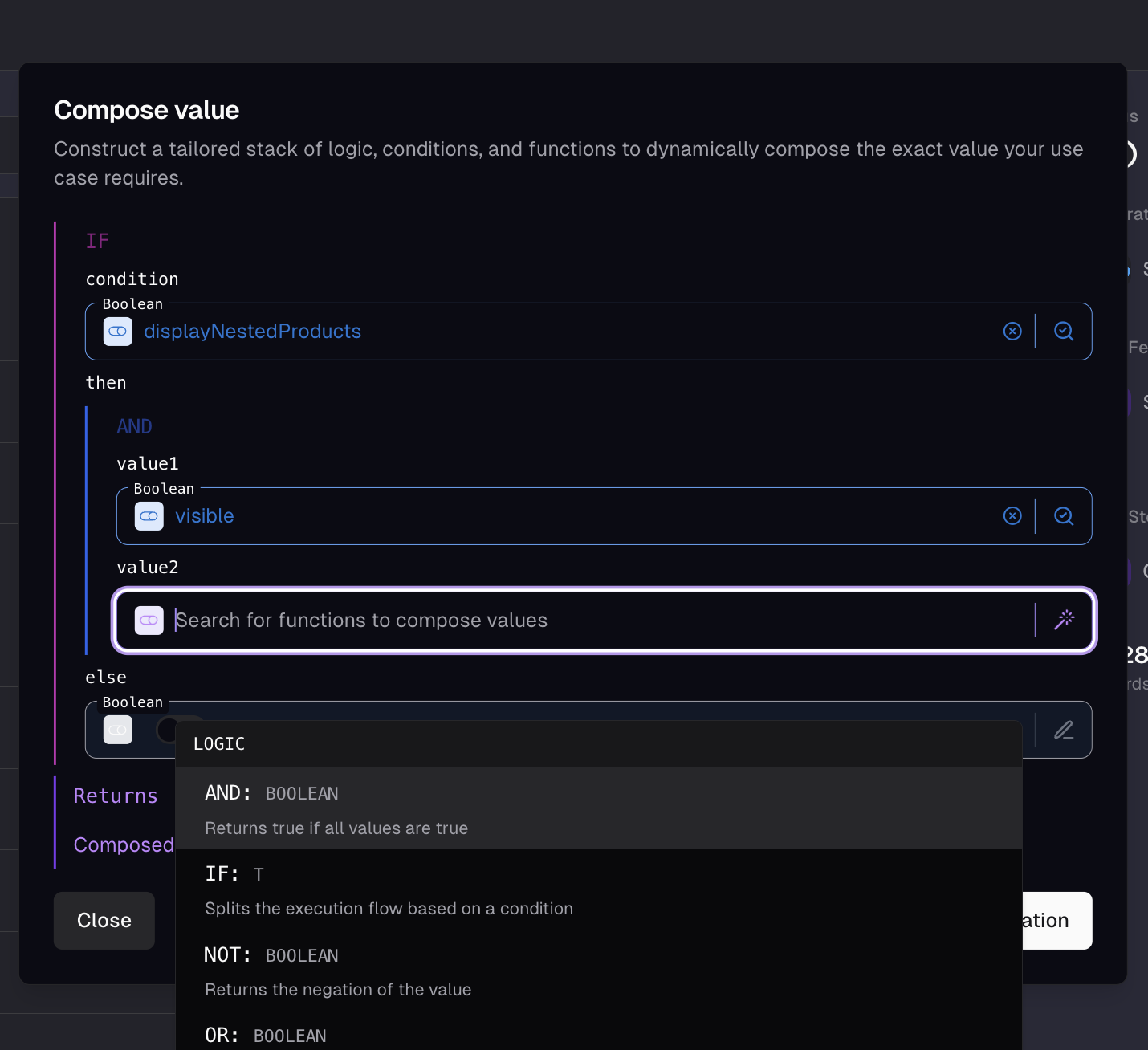
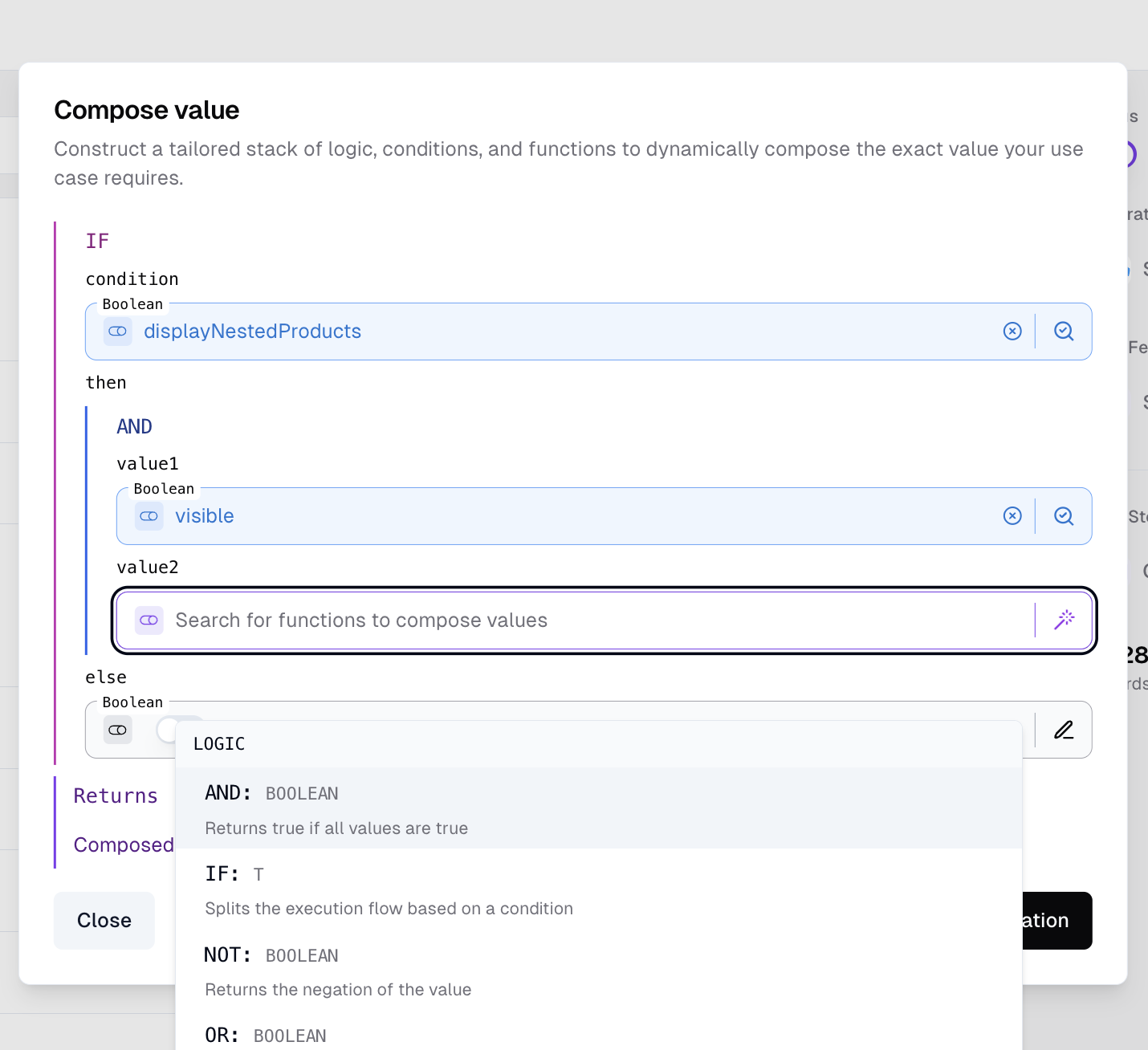 ## How operations are configured
A composer slot is a JSON object with a `source` discriminator. There are three sources you'll work with:
| Source | Shape | Use for |
| ------------ | ------------------------------------------------------------------------------------- | ---------------------------------------------------------------------------------------------- |
| `static` | `{ "source": "static", "value": , "outputType": "" }` | A fixed value baked into the configuration. |
| `data-field` | `{ "source": "data-field", "field": "path.to.field" }` | A reference to a field on the incoming feed record. Use `$item` / `$parent` inside iterations. |
| `composed` | `{ "source": "composed", "composition": { "type": "", "": , ... } }` | An operation. Each parameter is itself a slot, so operations nest arbitrarily. |
Putting it together — a `concat` of `vendor.name` + `-` + `name`, the JSON the admin UI emits:
```json theme={"theme":"css-variables"}
{
"source": "composed",
"composition": {
"type": "concat",
"value1": { "source": "data-field", "field": "vendor.name" },
"value2": { "source": "data-field", "field": "name" },
"separator": { "source": "static", "value": " - " }
}
}
```
The same recursion shows up everywhere: an `if` whose `then` is a `concat` of two static values, a `map` whose `mapFunction` is a `get` on `$item`, and so on. The catalogue below documents the parameter names and types each operation expects.
## Type compatibility
Every slot has a known output type, and operations declare what they accept:
* **Concrete types** (`number`, `string`, `boolean`, `array`, `object`) — the input slot must produce that exact type, or the configuration is invalid.
* **Type markers** (`T`, `K`, `V`) — polymorphic placeholders. The first input that fills a marker fixes the type for every other slot using the same marker. For example, `equals(value: T, compare: T)` accepts any type as long as `value` and `compare` agree — fill `value` with a string and `compare` is constrained to strings too.
The admin UI surfaces type mismatches in the slot's validation state — slots that can't yet produce the required type stay highlighted as invalid and the configuration won't save. There's no implicit coercion at runtime: a string flowing into a number slot raises an explicit type error rather than getting cast silently. When you actually want a cast, use `toString` / `toNumber` / `toBoolean` so the conversion is part of the chain. See [Error handling](#error-handling) for what happens when something does slip through.
## Array Operations
### `count`
Return the number of elements in an array.
The array to count elements in.
The element count.
### `filter`
Return the elements of an array that satisfy a condition. Each element is exposed as `$item` inside the filter expression.
The array to filter.
Boolean expression evaluated per element. Reference the current element with `$item`.
The elements that returned `true` from `filterFunction`.
```json filter $item.id == "color" theme={"theme":"css-variables"}
{
"source": "composed",
"composition": {
"type": "filter",
"array": { "source": "data-field", "field": "properties" },
"filterFunction": {
"source": "composed",
"composition": {
"type": "equals",
"value": { "source": "data-field", "field": "$item.id" },
"compare": { "source": "static", "value": "color" }
}
}
}
}
```
### `findFirst`
Return the first element of an array that satisfies a condition. Each element is exposed as `$item` inside the filter expression.
The array to search.
Boolean expression evaluated per element. Reference the current element with `$item`.
The first matching element, or `null` if none match.
### `first`
Return the first element of an array.
The array to take the first element from.
The first element, or `null` if the array is empty.
### `flatMap`
Apply a function to each element of an array, then flatten the resulting arrays into a single array. Each element is exposed as `$item` inside the map expression.
The array to map over.
Expression that returns an array per element. The returned arrays are concatenated.
The flattened result of all per-element mappings.
### `join`
Join an array of strings into a single string.
The array of strings to join.
Separator inserted between strings.
The joined string.
### `map`
Apply a function to each element of an array and return the resulting array. Each element is exposed as `$item` inside the map expression.
The array to map over.
Expression applied to each element.
The mapped array.
```json map images[] -> { url, alt } theme={"theme":"css-variables"}
{
"source": "composed",
"composition": {
"type": "map",
"array": { "source": "data-field", "field": "images" },
"mapFunction": {
"source": "composed",
"composition": {
"type": "object",
"properties": {
"url": { "source": "data-field", "field": "$item.path" },
"alt": { "source": "data-field", "field": "$item.alt" }
}
}
}
}
}
```
### `merge`
Merge two arrays of scalar values into one. Values in `additional` are appended to `base`.
The base array of scalar values.
Additional values appended to the base array.
The merged array.
### `slice`
Extract a portion of an array.
The array to slice.
Starting position (zero-based index).
Number of elements to extract.
The sliced array.
### `split`
Split a string into an array of strings.
The string to split.
The separator to split on.
The resulting array of substrings.
### `unique`
Remove duplicate values from a scalar array, preserving the order of first occurrence.
The array of scalar values to deduplicate.
The deduplicated array.
## Comparison Operations
### `equals`
Compare two values for equality.
The first value.
The second value.
`true` when the values are equal.
### `greaterThan`
Compare two numbers; `true` when the first is greater than the second.
The first number.
The number to compare against.
`true` when `value > compare`.
### `isEmpty`
Return whether a value is empty. Empty strings (after trim), empty arrays, `null`, and similar are `true`; numbers and `false` are not considered empty.
The value to check.
`true` when the value is empty.
### `isNull`
Return whether a value is `NULL`.
The value to check.
`true` when the value is `NULL`.
### `isScalar`
Return whether a value is a scalar (not an object or array). `null` is also considered scalar.
The value to check.
`true` when the value is a scalar or `null`.
## Logic Operations
### `and`
Return `true` when all values are `true`.
The first value.
The second value.
`true` when both values are `true`.
### `if`
Branch the execution flow based on a condition.
The condition to evaluate.
Returned when the condition is `true`.
Returned when the condition is `false`.
Either the `then` or the `else` value.
```json availability based on stock > 10 theme={"theme":"css-variables"}
{
"source": "composed",
"composition": {
"type": "if",
"condition": {
"source": "composed",
"composition": {
"type": "greaterThan",
"value": { "source": "data-field", "field": "stock" },
"compare": { "source": "static", "value": 10 }
}
},
"then": { "source": "static", "value": "in-stock" },
"else": { "source": "static", "value": "low" }
}
}
```
### `not`
Negate a boolean. Non-boolean values are coerced to `false` before negation.
The value to negate.
The negated value.
### `or`
Return `true` when at least one value is `true`.
The first value.
The second value.
`true` when either value is `true`.
### `xor`
Return `true` when exactly one value is `true` (exclusive or).
The first value.
The second value.
`true` when exactly one of the values is `true`.
## Math Operations
### `divide`
Divide two numbers (`numerator / denominator`).
The numerator.
The denominator.
The quotient.
### `exponent`
Raise a number to the power of another (`base^exponent`).
The base.
The exponent.
The result of the exponentiation.
### `multiply`
Multiply two numbers.
The first number.
The second number.
The product.
## Object Operations
### `get`
Read a value from an object by key.
The key of the field to access.
The object containing the field.
The value at the given key, or `null` if the key isn't present.
### `object`
Compose an object by resolving each property's expression.
A map of property names to value expressions.
The composed object.
## Text Operations
### `concat`
Concatenate two strings.
The first string.
The second string.
Separator inserted between the two strings.
The concatenated string.
### `contains`
Check whether a string contains another string, with optional case-insensitive matching.
The string to search in.
The substring to search for.
Whether to perform case-insensitive matching.
`true` when `value` contains `reference`.
### `length`
Return the number of characters in a string.
The string to measure.
The character count.
### `md5`
Hash a string with the MD5 algorithm. Useful for stable identifiers derived from input data.
The string to hash.
The MD5 hash as a 32-character hexadecimal string.
### `padLeft`
Pad a string on the left to a target length.
The string to pad.
The target length. Negative values disable padding.
The character to pad with.
The padded string.
### `padRight`
Pad a string on the right to a target length.
The string to pad.
The target length. Negative values disable padding.
The character to pad with.
The padded string.
### `replace`
Replace occurrences of a substring within a string.
The original string.
The substring to search for.
The replacement substring.
Whether the search is case-sensitive.
The string with replacements applied.
### `slugify`
Convert a string to a slug — lowercase, no spaces or special characters.
The string to convert.
Separator used to replace spaces and special characters.
The slugified string.
### `substring`
Extract a substring from a string.
The source string.
Starting position.
Substring length.
The extracted substring.
### `toLower`
Convert a string to lowercase.
The string to convert.
The lowercased string.
### `toUpper`
Convert a string to uppercase.
The string to convert.
The uppercased string.
### `trim`
Remove whitespace from the beginning and end of a string.
The string to trim.
The trimmed string.
## Transform Operations
### `toBoolean`
Convert a value to a boolean. Falsy values like `"false"`, `"0"`, and `[]` evaluate to `false`.
The value to convert.
The boolean result.
### `toNumber`
Convert a value to a number. `NULL` becomes `0`.
The value to convert.
The numeric result.
### `toString`
Convert a value to a string. `NULL` becomes an empty string.
The value to convert.
The string result.
## Utilities Operations
### `randomBoolean`
Return a random boolean. The `probability` controls how often `true` is returned, on a 0–100 scale.
Chance of returning `true`, from `0` (never) to `100` (always). Values outside the range are clamped.
A random boolean.
### `randomNumber`
Return a random number between `min` and `max` (both inclusive). Set `precision` to `0` for integers, or higher for decimals (e.g. `2` produces values like `3.14`).
Minimum value (inclusive).
Maximum value (inclusive).
Decimal places (0–10). `0` returns an integer.
A random number in the requested range.
## Error handling
The composer is strict about types and forgiving about absence:
* **Missing fields and keys resolve to `null`.** A `data-field` slot pointing at a path that doesn't exist on the current record returns `null`. `get` against a missing key returns `null`. The chain continues with `null` flowing through.
* **`null` inputs are absorbed where it makes sense.** Per-operation handling, not a global rule:
* `concat` coalesces `null` inputs to empty strings.
* `filter`, `map`, and other array operations coalesce a `null` array input to `[]` and return an empty array.
* `get` against a `null` object returns `null`.
* `findFirst` against an empty array returns `null`.
* **Type mismatches throw.** Operations don't implicitly coerce — passing a number into a string slot, or a non-array into `filter`'s `array` parameter, raises a runtime error and fails the sync. Use explicit `toString` / `toNumber` / `toBoolean` when you need a cast, so the conversion is visible in the chain.
* **Math has guard rails.** `divide` raises a runtime error on a zero denominator instead of producing `Infinity` or `NaN`.
* **Iteration context has a limit.** `filter` and `map` populate `$item` (and `$parent` when nested one level). Three or more nesting levels aren't supported and raise a runtime error — flatten with `flatMap` instead.
The [field-level debugger](/data-integration/value-composer#field-level-debugger) shows node-wise output for the configuration: when a chain produces an unexpected `null` or fails outright, the debugger pinpoints which operation introduced it. Use it before the configuration runs against real sync data.
Configuration errors that the type system can catch — an invalid operation type, a slot whose output can't satisfy the parent's expected type, a missing required parameter — show as inline validation on the affected slot in the admin UI; the configuration won't save until they're resolved. Backend resolution carries equivalent runtime checks as a backstop, raising explicit exceptions if an invalid configuration somehow reaches it.
## How operations are configured
A composer slot is a JSON object with a `source` discriminator. There are three sources you'll work with:
| Source | Shape | Use for |
| ------------ | ------------------------------------------------------------------------------------- | ---------------------------------------------------------------------------------------------- |
| `static` | `{ "source": "static", "value": , "outputType": "" }` | A fixed value baked into the configuration. |
| `data-field` | `{ "source": "data-field", "field": "path.to.field" }` | A reference to a field on the incoming feed record. Use `$item` / `$parent` inside iterations. |
| `composed` | `{ "source": "composed", "composition": { "type": "", "": , ... } }` | An operation. Each parameter is itself a slot, so operations nest arbitrarily. |
Putting it together — a `concat` of `vendor.name` + `-` + `name`, the JSON the admin UI emits:
```json theme={"theme":"css-variables"}
{
"source": "composed",
"composition": {
"type": "concat",
"value1": { "source": "data-field", "field": "vendor.name" },
"value2": { "source": "data-field", "field": "name" },
"separator": { "source": "static", "value": " - " }
}
}
```
The same recursion shows up everywhere: an `if` whose `then` is a `concat` of two static values, a `map` whose `mapFunction` is a `get` on `$item`, and so on. The catalogue below documents the parameter names and types each operation expects.
## Type compatibility
Every slot has a known output type, and operations declare what they accept:
* **Concrete types** (`number`, `string`, `boolean`, `array`, `object`) — the input slot must produce that exact type, or the configuration is invalid.
* **Type markers** (`T`, `K`, `V`) — polymorphic placeholders. The first input that fills a marker fixes the type for every other slot using the same marker. For example, `equals(value: T, compare: T)` accepts any type as long as `value` and `compare` agree — fill `value` with a string and `compare` is constrained to strings too.
The admin UI surfaces type mismatches in the slot's validation state — slots that can't yet produce the required type stay highlighted as invalid and the configuration won't save. There's no implicit coercion at runtime: a string flowing into a number slot raises an explicit type error rather than getting cast silently. When you actually want a cast, use `toString` / `toNumber` / `toBoolean` so the conversion is part of the chain. See [Error handling](#error-handling) for what happens when something does slip through.
## Array Operations
### `count`
Return the number of elements in an array.
The array to count elements in.
The element count.
### `filter`
Return the elements of an array that satisfy a condition. Each element is exposed as `$item` inside the filter expression.
The array to filter.
Boolean expression evaluated per element. Reference the current element with `$item`.
The elements that returned `true` from `filterFunction`.
```json filter $item.id == "color" theme={"theme":"css-variables"}
{
"source": "composed",
"composition": {
"type": "filter",
"array": { "source": "data-field", "field": "properties" },
"filterFunction": {
"source": "composed",
"composition": {
"type": "equals",
"value": { "source": "data-field", "field": "$item.id" },
"compare": { "source": "static", "value": "color" }
}
}
}
}
```
### `findFirst`
Return the first element of an array that satisfies a condition. Each element is exposed as `$item` inside the filter expression.
The array to search.
Boolean expression evaluated per element. Reference the current element with `$item`.
The first matching element, or `null` if none match.
### `first`
Return the first element of an array.
The array to take the first element from.
The first element, or `null` if the array is empty.
### `flatMap`
Apply a function to each element of an array, then flatten the resulting arrays into a single array. Each element is exposed as `$item` inside the map expression.
The array to map over.
Expression that returns an array per element. The returned arrays are concatenated.
The flattened result of all per-element mappings.
### `join`
Join an array of strings into a single string.
The array of strings to join.
Separator inserted between strings.
The joined string.
### `map`
Apply a function to each element of an array and return the resulting array. Each element is exposed as `$item` inside the map expression.
The array to map over.
Expression applied to each element.
The mapped array.
```json map images[] -> { url, alt } theme={"theme":"css-variables"}
{
"source": "composed",
"composition": {
"type": "map",
"array": { "source": "data-field", "field": "images" },
"mapFunction": {
"source": "composed",
"composition": {
"type": "object",
"properties": {
"url": { "source": "data-field", "field": "$item.path" },
"alt": { "source": "data-field", "field": "$item.alt" }
}
}
}
}
}
```
### `merge`
Merge two arrays of scalar values into one. Values in `additional` are appended to `base`.
The base array of scalar values.
Additional values appended to the base array.
The merged array.
### `slice`
Extract a portion of an array.
The array to slice.
Starting position (zero-based index).
Number of elements to extract.
The sliced array.
### `split`
Split a string into an array of strings.
The string to split.
The separator to split on.
The resulting array of substrings.
### `unique`
Remove duplicate values from a scalar array, preserving the order of first occurrence.
The array of scalar values to deduplicate.
The deduplicated array.
## Comparison Operations
### `equals`
Compare two values for equality.
The first value.
The second value.
`true` when the values are equal.
### `greaterThan`
Compare two numbers; `true` when the first is greater than the second.
The first number.
The number to compare against.
`true` when `value > compare`.
### `isEmpty`
Return whether a value is empty. Empty strings (after trim), empty arrays, `null`, and similar are `true`; numbers and `false` are not considered empty.
The value to check.
`true` when the value is empty.
### `isNull`
Return whether a value is `NULL`.
The value to check.
`true` when the value is `NULL`.
### `isScalar`
Return whether a value is a scalar (not an object or array). `null` is also considered scalar.
The value to check.
`true` when the value is a scalar or `null`.
## Logic Operations
### `and`
Return `true` when all values are `true`.
The first value.
The second value.
`true` when both values are `true`.
### `if`
Branch the execution flow based on a condition.
The condition to evaluate.
Returned when the condition is `true`.
Returned when the condition is `false`.
Either the `then` or the `else` value.
```json availability based on stock > 10 theme={"theme":"css-variables"}
{
"source": "composed",
"composition": {
"type": "if",
"condition": {
"source": "composed",
"composition": {
"type": "greaterThan",
"value": { "source": "data-field", "field": "stock" },
"compare": { "source": "static", "value": 10 }
}
},
"then": { "source": "static", "value": "in-stock" },
"else": { "source": "static", "value": "low" }
}
}
```
### `not`
Negate a boolean. Non-boolean values are coerced to `false` before negation.
The value to negate.
The negated value.
### `or`
Return `true` when at least one value is `true`.
The first value.
The second value.
`true` when either value is `true`.
### `xor`
Return `true` when exactly one value is `true` (exclusive or).
The first value.
The second value.
`true` when exactly one of the values is `true`.
## Math Operations
### `divide`
Divide two numbers (`numerator / denominator`).
The numerator.
The denominator.
The quotient.
### `exponent`
Raise a number to the power of another (`base^exponent`).
The base.
The exponent.
The result of the exponentiation.
### `multiply`
Multiply two numbers.
The first number.
The second number.
The product.
## Object Operations
### `get`
Read a value from an object by key.
The key of the field to access.
The object containing the field.
The value at the given key, or `null` if the key isn't present.
### `object`
Compose an object by resolving each property's expression.
A map of property names to value expressions.
The composed object.
## Text Operations
### `concat`
Concatenate two strings.
The first string.
The second string.
Separator inserted between the two strings.
The concatenated string.
### `contains`
Check whether a string contains another string, with optional case-insensitive matching.
The string to search in.
The substring to search for.
Whether to perform case-insensitive matching.
`true` when `value` contains `reference`.
### `length`
Return the number of characters in a string.
The string to measure.
The character count.
### `md5`
Hash a string with the MD5 algorithm. Useful for stable identifiers derived from input data.
The string to hash.
The MD5 hash as a 32-character hexadecimal string.
### `padLeft`
Pad a string on the left to a target length.
The string to pad.
The target length. Negative values disable padding.
The character to pad with.
The padded string.
### `padRight`
Pad a string on the right to a target length.
The string to pad.
The target length. Negative values disable padding.
The character to pad with.
The padded string.
### `replace`
Replace occurrences of a substring within a string.
The original string.
The substring to search for.
The replacement substring.
Whether the search is case-sensitive.
The string with replacements applied.
### `slugify`
Convert a string to a slug — lowercase, no spaces or special characters.
The string to convert.
Separator used to replace spaces and special characters.
The slugified string.
### `substring`
Extract a substring from a string.
The source string.
Starting position.
Substring length.
The extracted substring.
### `toLower`
Convert a string to lowercase.
The string to convert.
The lowercased string.
### `toUpper`
Convert a string to uppercase.
The string to convert.
The uppercased string.
### `trim`
Remove whitespace from the beginning and end of a string.
The string to trim.
The trimmed string.
## Transform Operations
### `toBoolean`
Convert a value to a boolean. Falsy values like `"false"`, `"0"`, and `[]` evaluate to `false`.
The value to convert.
The boolean result.
### `toNumber`
Convert a value to a number. `NULL` becomes `0`.
The value to convert.
The numeric result.
### `toString`
Convert a value to a string. `NULL` becomes an empty string.
The value to convert.
The string result.
## Utilities Operations
### `randomBoolean`
Return a random boolean. The `probability` controls how often `true` is returned, on a 0–100 scale.
Chance of returning `true`, from `0` (never) to `100` (always). Values outside the range are clamped.
A random boolean.
### `randomNumber`
Return a random number between `min` and `max` (both inclusive). Set `precision` to `0` for integers, or higher for decimals (e.g. `2` produces values like `3.14`).
Minimum value (inclusive).
Maximum value (inclusive).
Decimal places (0–10). `0` returns an integer.
A random number in the requested range.
## Error handling
The composer is strict about types and forgiving about absence:
* **Missing fields and keys resolve to `null`.** A `data-field` slot pointing at a path that doesn't exist on the current record returns `null`. `get` against a missing key returns `null`. The chain continues with `null` flowing through.
* **`null` inputs are absorbed where it makes sense.** Per-operation handling, not a global rule:
* `concat` coalesces `null` inputs to empty strings.
* `filter`, `map`, and other array operations coalesce a `null` array input to `[]` and return an empty array.
* `get` against a `null` object returns `null`.
* `findFirst` against an empty array returns `null`.
* **Type mismatches throw.** Operations don't implicitly coerce — passing a number into a string slot, or a non-array into `filter`'s `array` parameter, raises a runtime error and fails the sync. Use explicit `toString` / `toNumber` / `toBoolean` when you need a cast, so the conversion is visible in the chain.
* **Math has guard rails.** `divide` raises a runtime error on a zero denominator instead of producing `Infinity` or `NaN`.
* **Iteration context has a limit.** `filter` and `map` populate `$item` (and `$parent` when nested one level). Three or more nesting levels aren't supported and raise a runtime error — flatten with `flatMap` instead.
The [field-level debugger](/data-integration/value-composer#field-level-debugger) shows node-wise output for the configuration: when a chain produces an unexpected `null` or fails outright, the debugger pinpoints which operation introduced it. Use it before the configuration runs against real sync data.
Configuration errors that the type system can catch — an invalid operation type, a slot whose output can't satisfy the parent's expected type, a missing required parameter — show as inline validation on the affected slot in the admin UI; the configuration won't save until they're resolved. Backend resolution carries equivalent runtime checks as a backstop, raising explicit exceptions if an invalid configuration somehow reaches it.