> ## Documentation Index
> Fetch the complete documentation index at: https://docs.frontic.com/llms.txt
> Use this file to discover all available pages before exploring further.
# Release Flow
The three Frontic stages — `develop`, `preview`, `public` — aren't separate environments in the traditional sense. They're **three simultaneous views of the same project**, each pinned at a different version. This page walks through the mechanics of using them: creating previews, promoting to public, managing version tokens, and handling fallback gracefully.
If you haven't already, read the [Releases overview](/releases/overview) first for the mental model. This page is the practical how-to.
## Work in develop
Features start life in `develop`. Add fields to a storage, wire up a sync, build blocks, listings, and pages against the evolving schema — every change lands in `develop` immediately, and you can build the frontend against it in parallel. Regenerate the Client SDK whenever the surface changes so your code stays in sync:
```bash theme={"theme":"css-variables"}
frontic generate --env develop
```
Iterate until the feature feels right. Nothing you do here affects `public` — customers still see whatever release is currently promoted. When the stack-side work is ready for QA, create a preview to freeze it.
## Create a preview
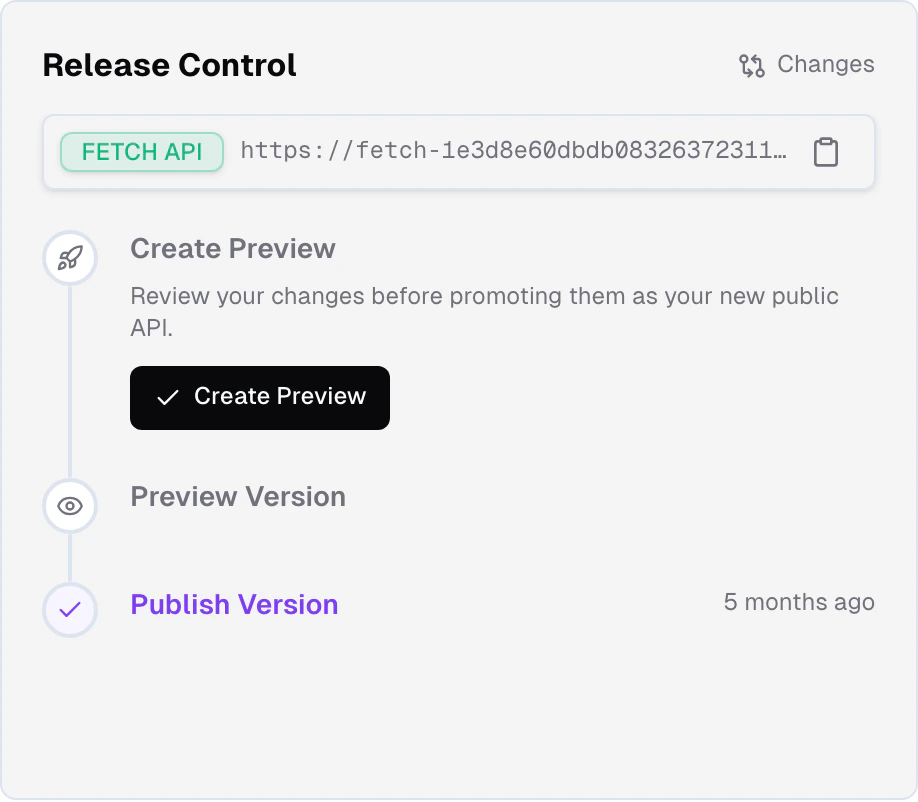
Previews are created from the live `develop` state. Open your project's dashboard in the admin app and click ** Create Preview** in the **Release Control** section.
 Creating a preview overwrites any existing preview. You only get one
preview per project at a time. If you need to test two parallel changes,
finish one and promote it before starting the next.
Under the hood, Frontic clones the current develop project end-to-end — schemas, syncs, blocks, listings, pages, project settings — into a new project with its own version token, and re-runs the data pipeline against the clone. The preview's records are shaped by its own configuration, so schema, sync mappings, and records stay consistent with each other regardless of what happens to develop afterward. Creation takes a moment; track progress in Release Control.
Once the preview exists, it's pinned to the state of `develop` at the moment you created it. Subsequent changes to `develop` don't affect the preview; you're testing a stable snapshot.
## Test against a preview
A preview is useful only if your frontend can talk to it. That's what **version tokens** are for.
From your editor, run `frontic generate`. The CLI prompts you to pick
which version to target — select **preview**. The generated SDK embeds
the preview's version token directly.
```bash theme={"theme":"css-variables"}
frontic generate
# or non-interactively:
frontic generate --env preview
```
The token is baked into the generated client files, not stored in an
env var you have to remember to flip.
Your frontend now talks to the preview snapshot instead of `public`.
This is the version you QA against — not a moving target, not a
rebase of `develop`, but a frozen frame of everything.
If you find issues, fix them in `develop`, create a new preview
(overwriting the old one), regenerate the SDK, and test again. Each
iteration gets a fresh snapshot.
## Promote to public
When the preview passes your tests, open your project's dashboard and click ** Promote to Public** in Release Control.
Promotion is **instant**. All three version stages — `develop`, `preview`, and `public` — run their own pipelines continuously, so the preview's records are already up-to-date with the latest feed data at the moment you promote. Nothing needs to re-process; promotion is a pointer flip. Every frontend talking to `public` starts seeing the new version in the same moment. No downtime, no version skew between callers, no forward-compatibility code to maintain — it's an atomic swap.
After promotion, the preview slot is empty again and Release Control hides the preview section until you create a new one.
## Version tokens
A version token is a **short identifier** that pins a caller to an exact project snapshot. Frontic uses it on every API call via the `FS-Version` HTTP header:
```
FS-Version:
```
You rarely see this header directly. The [Client SDK](/reference/client-sdk) embeds the token automatically when you generate it, so every call your frontend makes carries the right token.
Token lifecycle:
Points callers at the current preview. Generated when you create a
preview; expires when it's promoted or overwritten.
Points callers at the current `public` version. Requests without an
`FS-Version` header land here by default.
Points callers at the live `develop` state — the work-in-progress
version. For active development; not for production traffic.
## Graceful fallback
The magic of version tokens is what happens when they stop being valid.
The preview token your SDK was generated with now points at a snapshot
that's been merged into `public`. Instead of erroring, Frontic
**silently falls back to `public`** — which, post-promotion, serves
the same content. Your frontend keeps working with zero code changes.
If the `FS-Version` header is missing, every call goes to `public`.
This is the default behavior for public traffic that doesn't come
through your generated SDK.
The practical upshot: **you never have to clean up tokens**. Your frontend code doesn't change across a release promotion. You ship the Client SDK that points at your preview, test it, promote, and the same SDK keeps working against the promoted version automatically.
If a new preview replaces yours mid-test, regenerate the Client SDK: `frontic generate --env preview` pulls in any schema changes and the new version token in one step. Typecheck handles the rest.
## Independent deploys
Because version tokens decouple the frontend's view of the API from which stage that API lives in, you can deploy in either order:
* **Backend first** — create a preview, test it, promote. Your existing frontend (on an older token) still works against the new `public` via fallback. When you're ready, ship a frontend update against the new state.
* **Frontend first** — generate an SDK against a preview, deploy the new frontend referencing it. Customers still hit the *old* `public` until you promote. When you promote, the swap is instant.
Most teams mix both depending on the change. Small backend-only changes don't need a frontend deploy. Small frontend-only changes don't need a backend change. Coupled changes ship the Client SDK and frontend code together, targeting a preview, and promote when everything's green.
## Rollback
Preview — rollback is on the near-term roadmap. The shape may change before release.
When a preview promotes to public, Frontic will keep the previous public version around for a defined retention window. If something breaks after promotion, you can flip back to the previous version instantly — the same atomic-swap mechanics as the promotion, just reversed.
Today, if you need to undo a promotion, you make the opposite change in `develop`, create a new preview, and promote it — the same flow as any other change.
## Related
The version stages, the lifecycle, and the mental model.
Exactly what a snapshot contains — and what it doesn't.
Creating a preview overwrites any existing preview. You only get one
preview per project at a time. If you need to test two parallel changes,
finish one and promote it before starting the next.
Under the hood, Frontic clones the current develop project end-to-end — schemas, syncs, blocks, listings, pages, project settings — into a new project with its own version token, and re-runs the data pipeline against the clone. The preview's records are shaped by its own configuration, so schema, sync mappings, and records stay consistent with each other regardless of what happens to develop afterward. Creation takes a moment; track progress in Release Control.
Once the preview exists, it's pinned to the state of `develop` at the moment you created it. Subsequent changes to `develop` don't affect the preview; you're testing a stable snapshot.
## Test against a preview
A preview is useful only if your frontend can talk to it. That's what **version tokens** are for.
From your editor, run `frontic generate`. The CLI prompts you to pick
which version to target — select **preview**. The generated SDK embeds
the preview's version token directly.
```bash theme={"theme":"css-variables"}
frontic generate
# or non-interactively:
frontic generate --env preview
```
The token is baked into the generated client files, not stored in an
env var you have to remember to flip.
Your frontend now talks to the preview snapshot instead of `public`.
This is the version you QA against — not a moving target, not a
rebase of `develop`, but a frozen frame of everything.
If you find issues, fix them in `develop`, create a new preview
(overwriting the old one), regenerate the SDK, and test again. Each
iteration gets a fresh snapshot.
## Promote to public
When the preview passes your tests, open your project's dashboard and click ** Promote to Public** in Release Control.
Promotion is **instant**. All three version stages — `develop`, `preview`, and `public` — run their own pipelines continuously, so the preview's records are already up-to-date with the latest feed data at the moment you promote. Nothing needs to re-process; promotion is a pointer flip. Every frontend talking to `public` starts seeing the new version in the same moment. No downtime, no version skew between callers, no forward-compatibility code to maintain — it's an atomic swap.
After promotion, the preview slot is empty again and Release Control hides the preview section until you create a new one.
## Version tokens
A version token is a **short identifier** that pins a caller to an exact project snapshot. Frontic uses it on every API call via the `FS-Version` HTTP header:
```
FS-Version:
```
You rarely see this header directly. The [Client SDK](/reference/client-sdk) embeds the token automatically when you generate it, so every call your frontend makes carries the right token.
Token lifecycle:
Points callers at the current preview. Generated when you create a
preview; expires when it's promoted or overwritten.
Points callers at the current `public` version. Requests without an
`FS-Version` header land here by default.
Points callers at the live `develop` state — the work-in-progress
version. For active development; not for production traffic.
## Graceful fallback
The magic of version tokens is what happens when they stop being valid.
The preview token your SDK was generated with now points at a snapshot
that's been merged into `public`. Instead of erroring, Frontic
**silently falls back to `public`** — which, post-promotion, serves
the same content. Your frontend keeps working with zero code changes.
If the `FS-Version` header is missing, every call goes to `public`.
This is the default behavior for public traffic that doesn't come
through your generated SDK.
The practical upshot: **you never have to clean up tokens**. Your frontend code doesn't change across a release promotion. You ship the Client SDK that points at your preview, test it, promote, and the same SDK keeps working against the promoted version automatically.
If a new preview replaces yours mid-test, regenerate the Client SDK: `frontic generate --env preview` pulls in any schema changes and the new version token in one step. Typecheck handles the rest.
## Independent deploys
Because version tokens decouple the frontend's view of the API from which stage that API lives in, you can deploy in either order:
* **Backend first** — create a preview, test it, promote. Your existing frontend (on an older token) still works against the new `public` via fallback. When you're ready, ship a frontend update against the new state.
* **Frontend first** — generate an SDK against a preview, deploy the new frontend referencing it. Customers still hit the *old* `public` until you promote. When you promote, the swap is instant.
Most teams mix both depending on the change. Small backend-only changes don't need a frontend deploy. Small frontend-only changes don't need a backend change. Coupled changes ship the Client SDK and frontend code together, targeting a preview, and promote when everything's green.
## Rollback
Preview — rollback is on the near-term roadmap. The shape may change before release.
When a preview promotes to public, Frontic will keep the previous public version around for a defined retention window. If something breaks after promotion, you can flip back to the previous version instantly — the same atomic-swap mechanics as the promotion, just reversed.
Today, if you need to undo a promotion, you make the opposite change in `develop`, create a new preview, and promote it — the same flow as any other change.
## Related
The version stages, the lifecycle, and the mental model.
Exactly what a snapshot contains — and what it doesn't.