> ## Documentation Index
> Fetch the complete documentation index at: https://docs.frontic.com/llms.txt
> Use this file to discover all available pages before exploring further.
# Overview
Release Control is available on the **Plus plan**. See [Billing &
Plans](/admin/billing-and-plans) for details.
Every non-trivial shopping experience eventually faces the same problem: a change that's safe in isolation breaks something upstream, and by the time you notice, the broken state is already live. **Releases** are how Frontic keeps that from happening.
A **release** is a snapshot of everything in your project at a single point in time — storage schemas, syncs, blocks, listings, pages, project settings — bundled together and shipped as one unit. Not only API versioning. The whole project config.
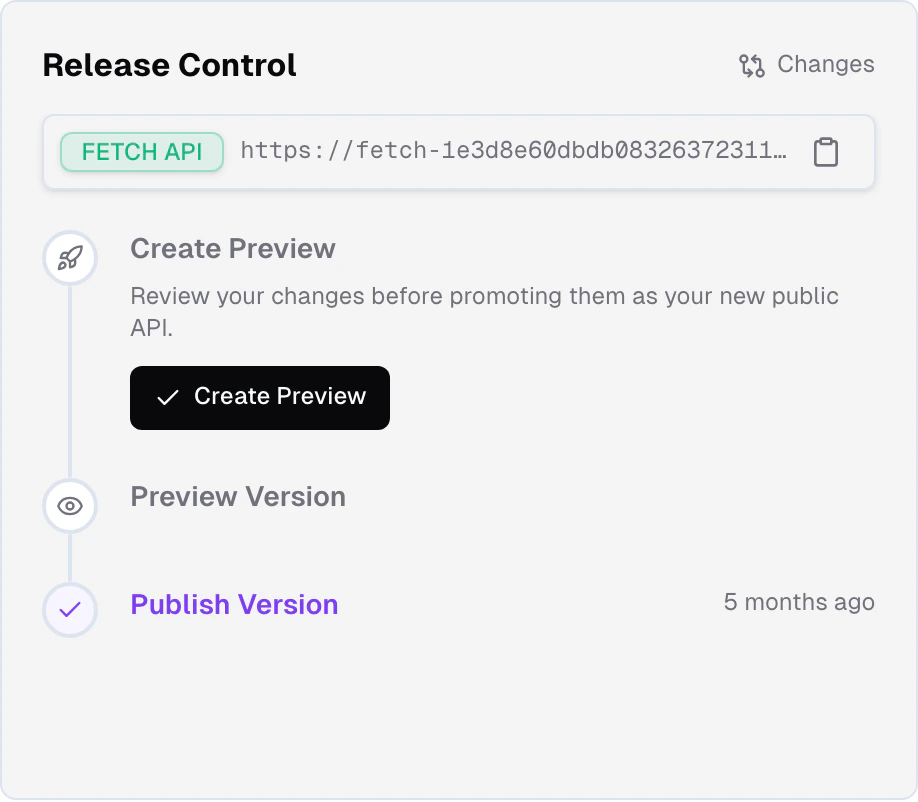
 ## Version stages
Every Frontic project exposes three versions of itself at all times:
The live state of your project. Every change you make in the Frontic
app, through Buddy, in Studio, or via MCP lands here immediately.
This is where builders work.
A frozen snapshot of `develop` captured at a specific point in time.
Use this to test the full project state end-to-end before it hits
production.
What your shopping experience talks to. Your customers
always see this version. Changes only reach `public` when you
explicitly promote a preview.
The version stages aren't environments in the traditional sense — they're three **simultaneous views of the same project**, each pinned at a different version. You don't maintain parallel projects; you work in `develop`, freeze a `preview` when you're ready, and promote to `public` when you're satisfied.
## Drafts
Preview — drafts are in active development. Specifics may change before general availability.
For changes that need more isolation than `develop` offers, Frontic is introducing **drafts**: short-lived sandboxes cloned from `develop` that let you prepare and review work without affecting the main project state. Each draft runs with its own version token and a sampled slice of your feed data, so you can iterate end-to-end without disturbing `develop` for the rest of the team. Multiple drafts can exist in parallel.
Changes in a draft merge back to `develop` through a review and approval workflow — a draft can't land on `develop` until a reviewer approves it, with conflict detection across schemas, sync mappings, and API surface as part of the review. Release Control runs from `develop` as usual, so an approved draft flows in first, then follows the normal preview → promote path.
The path forward: pairing drafts with [Studio jobs](/studio/frontic-studio) and with GitHub PRs, so an isolated sandbox, the frontend code that depends on it, and the release that ships it all move together through one workflow.
## How a change flows through
You (or Buddy, or the Studio chat, or an MCP agent) change something —
add a field to a storage, rewrite a sync mapping, adjust a listing
filter, add a new page. The change is live in `develop` immediately,
and Frontic revalidates any data that depends on it.
Developers can build against `develop` right away. Customers see
nothing.
From your editor, run [`frontic generate`](/reference/frontic-cli) to
generate a [Client SDK](/reference/client-sdk) targeting the current
`develop` state. The SDK contains a version token that pins your
frontend to exactly this snapshot of the API.
Use the generated SDK to build whatever UI the change enables — in
Studio, in your editor, or both. Your frontend is now pinned to the
exact API contract it was designed for, regardless of what happens
in `develop` afterward.
When you're ready to lock in the stack-side changes for testing,
create a **preview**. The preview freezes the current `develop` state
into a snapshot you can validate without moving targets. Any existing
preview is overwritten.
Regenerate the Client SDK against the preview, run your frontend
against it, go through QA. The frozen snapshot means whatever you
tested is exactly what will ship.
When the preview is validated, promote it. Promotion is **instant** —
the preview directly replaces `public`, and your customers start
seeing the new version immediately. The Client SDK your frontend is
pinned to keeps working through the transition because version tokens
fall back gracefully.
See [What's in a Release](/releases/what-flows-through) for the full list of what a snapshot contains, and [Release Flow](/releases/release-flow) for the mechanics of previews, promotions, and version tokens.
## Version tokens
A Client SDK generated against a specific version carries a **version token** in the `FS-Version` header on every request. Frontic uses the token to route the request to the exact snapshot the SDK was generated for.
That means:
* Your frontend always talks to the API version it was built against
* You can deploy frontend and backend changes independently without breaking compatibility
* When a preview is promoted, the token falls back gracefully to `public` — your frontend keeps working through the transition with no code change
If no token is supplied (or the token is no longer valid because the snapshot it pointed to has been replaced), the request falls back to the current `public` version. No broken requests, no manual cleanup.
## Pairs with your codebase
Release Control is designed to map 1:1 to the codebase that consumes your project. Your repo's deploy pipeline drives the frontend; Release Control drives the stack. Promote a preview, regenerate the Client SDK, deploy — the two pipelines move in lockstep. The forthcoming GitHub integration deepens this: PR tracking, auto-release of new API versions, and release state surfaced on PRs. See [Core Concepts](/essentials/core-concepts#project) for why one project should pair with one codebase.
## Related
The complete list of what a release snapshot contains — storages,
syncs, API surface, project settings, and more.
The mechanics: creating previews, promoting to public, version tokens,
and graceful fallback.
## Version stages
Every Frontic project exposes three versions of itself at all times:
The live state of your project. Every change you make in the Frontic
app, through Buddy, in Studio, or via MCP lands here immediately.
This is where builders work.
A frozen snapshot of `develop` captured at a specific point in time.
Use this to test the full project state end-to-end before it hits
production.
What your shopping experience talks to. Your customers
always see this version. Changes only reach `public` when you
explicitly promote a preview.
The version stages aren't environments in the traditional sense — they're three **simultaneous views of the same project**, each pinned at a different version. You don't maintain parallel projects; you work in `develop`, freeze a `preview` when you're ready, and promote to `public` when you're satisfied.
## Drafts
Preview — drafts are in active development. Specifics may change before general availability.
For changes that need more isolation than `develop` offers, Frontic is introducing **drafts**: short-lived sandboxes cloned from `develop` that let you prepare and review work without affecting the main project state. Each draft runs with its own version token and a sampled slice of your feed data, so you can iterate end-to-end without disturbing `develop` for the rest of the team. Multiple drafts can exist in parallel.
Changes in a draft merge back to `develop` through a review and approval workflow — a draft can't land on `develop` until a reviewer approves it, with conflict detection across schemas, sync mappings, and API surface as part of the review. Release Control runs from `develop` as usual, so an approved draft flows in first, then follows the normal preview → promote path.
The path forward: pairing drafts with [Studio jobs](/studio/frontic-studio) and with GitHub PRs, so an isolated sandbox, the frontend code that depends on it, and the release that ships it all move together through one workflow.
## How a change flows through
You (or Buddy, or the Studio chat, or an MCP agent) change something —
add a field to a storage, rewrite a sync mapping, adjust a listing
filter, add a new page. The change is live in `develop` immediately,
and Frontic revalidates any data that depends on it.
Developers can build against `develop` right away. Customers see
nothing.
From your editor, run [`frontic generate`](/reference/frontic-cli) to
generate a [Client SDK](/reference/client-sdk) targeting the current
`develop` state. The SDK contains a version token that pins your
frontend to exactly this snapshot of the API.
Use the generated SDK to build whatever UI the change enables — in
Studio, in your editor, or both. Your frontend is now pinned to the
exact API contract it was designed for, regardless of what happens
in `develop` afterward.
When you're ready to lock in the stack-side changes for testing,
create a **preview**. The preview freezes the current `develop` state
into a snapshot you can validate without moving targets. Any existing
preview is overwritten.
Regenerate the Client SDK against the preview, run your frontend
against it, go through QA. The frozen snapshot means whatever you
tested is exactly what will ship.
When the preview is validated, promote it. Promotion is **instant** —
the preview directly replaces `public`, and your customers start
seeing the new version immediately. The Client SDK your frontend is
pinned to keeps working through the transition because version tokens
fall back gracefully.
See [What's in a Release](/releases/what-flows-through) for the full list of what a snapshot contains, and [Release Flow](/releases/release-flow) for the mechanics of previews, promotions, and version tokens.
## Version tokens
A Client SDK generated against a specific version carries a **version token** in the `FS-Version` header on every request. Frontic uses the token to route the request to the exact snapshot the SDK was generated for.
That means:
* Your frontend always talks to the API version it was built against
* You can deploy frontend and backend changes independently without breaking compatibility
* When a preview is promoted, the token falls back gracefully to `public` — your frontend keeps working through the transition with no code change
If no token is supplied (or the token is no longer valid because the snapshot it pointed to has been replaced), the request falls back to the current `public` version. No broken requests, no manual cleanup.
## Pairs with your codebase
Release Control is designed to map 1:1 to the codebase that consumes your project. Your repo's deploy pipeline drives the frontend; Release Control drives the stack. Promote a preview, regenerate the Client SDK, deploy — the two pipelines move in lockstep. The forthcoming GitHub integration deepens this: PR tracking, auto-release of new API versions, and release state surfaced on PRs. See [Core Concepts](/essentials/core-concepts#project) for why one project should pair with one codebase.
## Related
The complete list of what a release snapshot contains — storages,
syncs, API surface, project settings, and more.
The mechanics: creating previews, promoting to public, version tokens,
and graceful fallback.