> ## Documentation Index
> Fetch the complete documentation index at: https://docs.frontic.com/llms.txt
> Use this file to discover all available pages before exploring further.
# URLs, Redirects & SEO
URLs are not a detail. They're the address every search engine, every inbound link, every bookmark, every share, and every customer relies on. If a URL that worked yesterday stops working today, you don't only lose a page — you lose rankings, referrals, and customer trust.
SEO URLs in commerce are also one of those problems nobody quite agrees on. Every team has an opinion on the right shape, every project shows up with its own demands, and most stacks leave the whole question to the storefront to answer. Strip away the arguments, though, and the underlying pattern is always the same: hand over the (localized) key the visitor hit, get back everything needed to render the page.
Frontic treats URL handling as **first-class commerce infrastructure**, not a routing afterthought. You own the strategy — what URLs look like, when to redirect, how to resolve conflicts. The stack ships the mechanics — generation, history, localized alternates, response codes, SEO metadata.
## How URLs are generated
A [page](/api-builder/pages) is how Frontic assigns a URL to content. When you create a page, you pick:
* a **block** — what kind of content does this route render? (A category page, a product page, an article page.)
* a **slug field** — which field on the block's record should become the URL slug? (`name`, `breadcrumbs`, `handle`.)
Frontic generates the actual routes automatically from your data. For every record in the connected Data Storage, a URL is minted from the slug field. Ten thousand products in your storage becomes ten thousand working URLs in your project, without you touching a router config.
## Fetch a page
The frontend doesn't need a local route table. It takes the incoming URL, asks Frontic, and gets back the block, the data, and the route metadata in one call:
```ts theme={"theme":"css-variables"}
const { slug } = useRoute().params;
const { page } = await client.page(slug);
// page.type — "CategoryDetail" | "ProductDetail" | "ArticlePage" | ...
// page.block — the block name to render against
// page.data — the actual content for this URL
// page.route — alternates, suggested redirects, response code
```
The `type` field tells your frontend which component to mount; the `data` field has the content; the `route` field has everything you need for SEO, hreflang, and redirect handling.
## URL history
The hardest part of commerce URLs isn't minting them — it's **not breaking them**. Products change names. Categories get renamed. Slugs shift because someone fixed a typo. In every one of those cases, the old URL needs to either continue working or redirect to the new one, not 404.
Frontic tracks URL history per page automatically, and lets you decide what happens when a slug changes. When you create a page, you configure an **Action on withdrawal**:
The most common choice. Temporary redirect. Use when the content is
gone and you want search engines to keep revisiting.
Permanent redirect. Use when the URL is genuinely retired and should
be removed from search indexes over time.
The URL disappears from the project entirely. Callers get a 404 and
no redirect. Use sparingly.
The URL stays in Frontic's history but serves a 404 response.
Useful when you want analytics on broken inbound traffic.
When the slug on a page changes, Frontic emits the configured response automatically — you don't write redirect rules. The old URL keeps working (or fails gracefully) forever, without you maintaining a list.
## URL Browser
Use the [URL Browser](https://app.frontic.com/builder/urls) in the admin app to inspect the URLs Frontic has generated for your project. It lives in the API Builder section next to Blocks, Listings, Pages, and Trees.
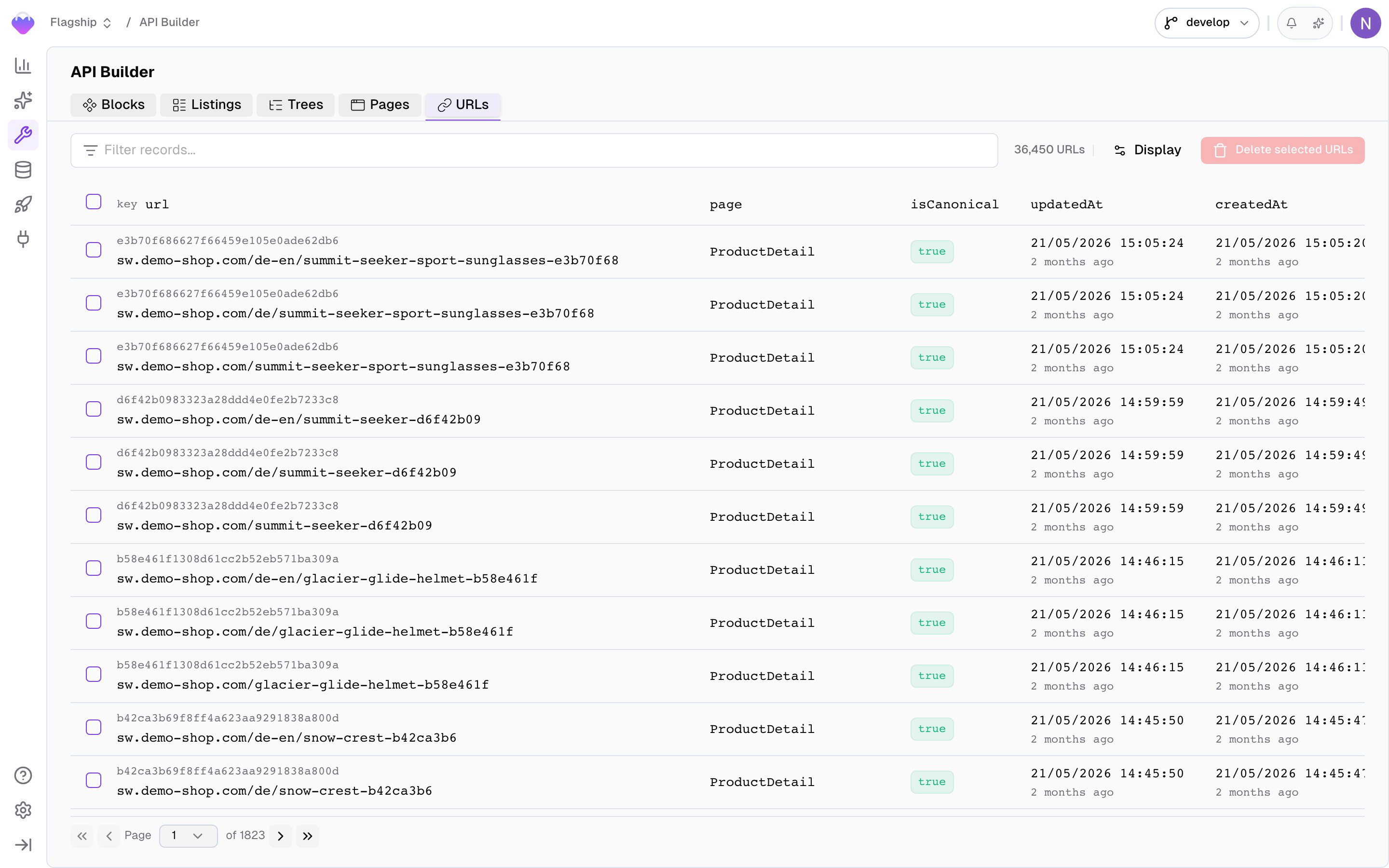
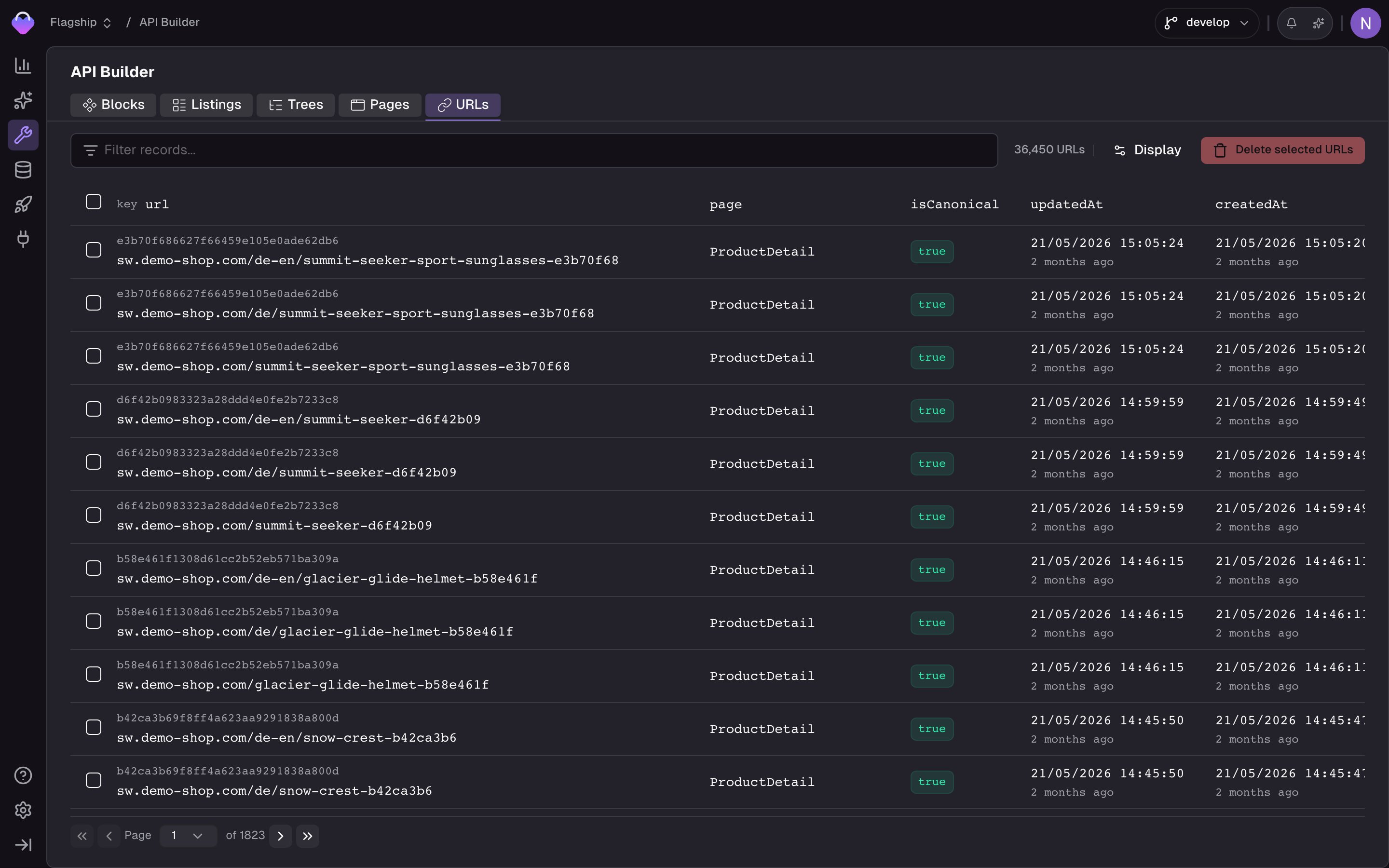 The browser shows every generated Page URL in a searchable, filterable table. You can filter by URL, key, page, domain, and canonical status; sort by creation time, update time, key, or URL; and page through larger URL sets with configurable page sizes. Selecting rows lets you delete stale URLs in bulk.
Click a row to open its detail sidebar. The sidebar shows the full URL record, including `url`, `key`, `page`, `block`, `domain`, `region`, `locale`, `isCanonical`, `pageRecordDeleteStrategy`, and timestamps. `isCanonical` tells you whether the URL is the current active URL for that record; historical URLs are kept for redirects or 404 handling. `pageRecordDeleteStrategy` mirrors the page's **Action on withdrawal** setting.
Use the URL Browser when you need to debug URL generation, verify that localized URLs were created correctly, find which page a given URL resolves to, inspect canonical versus historical URLs, launch the Fetch API playground for a specific URL, or manually remove stale URLs.
## Conflict resolution
URLs must be unique. What happens when two products with the same name would generate the same slug? You configure a **conflict resolution strategy** on the page:
| Strategy | Behavior |
| ---------------- | ------------------------------------------------------------------------------------------------------ |
| **Append token** | A secondary field (e.g. SKU, ID) is appended to the slug to disambiguate it. `shirt` + `shirt-abc123`. |
| **Dismiss** | The second page isn't created. The colliding record doesn't get a URL. |
Pick whichever fits your SEO strategy. Append is the usual choice for products; dismiss is sometimes used for low-value content.
## Localized URLs
A page in a multi-locale project automatically generates a URL **per supported locale**, and the response from `client.page(slug)` includes the full alternates list in `page.route.alternates`:
```json theme={"theme":"css-variables"}
{
"route": {
"code": 200,
"alternates": [
{ "slug": "shop/ausstattung", "path": "/de/shop/ausstattung", "region": "de", "locale": "de-DE" },
{ "slug": "shop/equipment", "path": "/en/shop/equipment", "region": "en", "locale": "en-GB" }
]
}
}
```
Use `alternates` to:
* **render `hreflang` tags** so Google serves the right language to the right user
* **build intelligent language switchers** that link to the same content in another language, not only to the home page of a different locale
* **power browser-language-based suggestions** ("we noticed you're reading in English — want to switch?")
## Context mismatches
If the caller's context (from `requestUrl` or an access token) doesn't match the URL they asked for — for example, a `de-DE` token requesting an `/en/...` path — Frontic returns a `suggested` alternate instead of silently serving the wrong content:
```json theme={"theme":"css-variables"}
{
"route": {
"code": 200,
"alternates": [ /* ... */ ]
},
"context": {
"region": "en",
"locale": "en-GB",
"suggested": {
"slug": "shop/equipment",
"path": "/en/shop/ausstattung",
"href": "https://www.demo-shop.com/en/shop/equipment",
"region": "en",
"locale": "en-GB"
}
}
}
```
Your frontend can use `context.suggested` to prompt the user, auto-redirect, or adjust the canonical tag. The stack never guesses on your behalf.
## 404s and redirects
When a URL doesn't resolve, the response still has shape — there's no special error path, only a different `route.code`:
```json theme={"theme":"css-variables"}
{
"route": {
"code": 404,
"redirect": {
"slug": "",
"path": "",
"href": "https://www.demo-shop.com"
}
}
}
```
```json theme={"theme":"css-variables"}
{
"route": {
"code": 301,
"redirect": {
"slug": "shop/equipment",
"path": "/en/shop/equipment",
"href": "https://www.demo-shop.com/en/shop/equipment"
}
}
}
```
```json theme={"theme":"css-variables"}
{
"route": {
"code": 302,
"redirect": {
"slug": "",
"path": "",
"href": "https://www.demo-shop.com"
}
}
}
```
Your frontend uses `route.code` to set its HTTP response code and `route.redirect.href` as the location. One code path, all the cases.
## SEO metadata
Frontic ships with a built-in **`SEO` composite** field type. Add it to your Data Storage schema and you get a structured field for meta title, meta description, keywords, and canonical settings, ready to flow through your blocks into the response.
```
Data Storage field: seo → type: SEO → translatable: true
```
The `SEO` composite is commerce-aware — it knows about the shapes and constraints of product SEO, category SEO, and content SEO. See [Storage Field Types](/reference/storage-field-types#composites) for the full schema.
Because the field is translatable, each locale gets its own SEO values. Because it flows through your blocks, your `CategoryDetail` or `ProductPage` block decides which fields of the `SEO` composite to expose in its response — and your frontend renders them into `` tags per request.
## Related
The full Page URL configuration — slug fields, withdrawal actions,
conflict strategies, menus.
How scopes, regions, and locales shape URL alternates.
The `SEO` composite and every other built-in field type.
The browser shows every generated Page URL in a searchable, filterable table. You can filter by URL, key, page, domain, and canonical status; sort by creation time, update time, key, or URL; and page through larger URL sets with configurable page sizes. Selecting rows lets you delete stale URLs in bulk.
Click a row to open its detail sidebar. The sidebar shows the full URL record, including `url`, `key`, `page`, `block`, `domain`, `region`, `locale`, `isCanonical`, `pageRecordDeleteStrategy`, and timestamps. `isCanonical` tells you whether the URL is the current active URL for that record; historical URLs are kept for redirects or 404 handling. `pageRecordDeleteStrategy` mirrors the page's **Action on withdrawal** setting.
Use the URL Browser when you need to debug URL generation, verify that localized URLs were created correctly, find which page a given URL resolves to, inspect canonical versus historical URLs, launch the Fetch API playground for a specific URL, or manually remove stale URLs.
## Conflict resolution
URLs must be unique. What happens when two products with the same name would generate the same slug? You configure a **conflict resolution strategy** on the page:
| Strategy | Behavior |
| ---------------- | ------------------------------------------------------------------------------------------------------ |
| **Append token** | A secondary field (e.g. SKU, ID) is appended to the slug to disambiguate it. `shirt` + `shirt-abc123`. |
| **Dismiss** | The second page isn't created. The colliding record doesn't get a URL. |
Pick whichever fits your SEO strategy. Append is the usual choice for products; dismiss is sometimes used for low-value content.
## Localized URLs
A page in a multi-locale project automatically generates a URL **per supported locale**, and the response from `client.page(slug)` includes the full alternates list in `page.route.alternates`:
```json theme={"theme":"css-variables"}
{
"route": {
"code": 200,
"alternates": [
{ "slug": "shop/ausstattung", "path": "/de/shop/ausstattung", "region": "de", "locale": "de-DE" },
{ "slug": "shop/equipment", "path": "/en/shop/equipment", "region": "en", "locale": "en-GB" }
]
}
}
```
Use `alternates` to:
* **render `hreflang` tags** so Google serves the right language to the right user
* **build intelligent language switchers** that link to the same content in another language, not only to the home page of a different locale
* **power browser-language-based suggestions** ("we noticed you're reading in English — want to switch?")
## Context mismatches
If the caller's context (from `requestUrl` or an access token) doesn't match the URL they asked for — for example, a `de-DE` token requesting an `/en/...` path — Frontic returns a `suggested` alternate instead of silently serving the wrong content:
```json theme={"theme":"css-variables"}
{
"route": {
"code": 200,
"alternates": [ /* ... */ ]
},
"context": {
"region": "en",
"locale": "en-GB",
"suggested": {
"slug": "shop/equipment",
"path": "/en/shop/ausstattung",
"href": "https://www.demo-shop.com/en/shop/equipment",
"region": "en",
"locale": "en-GB"
}
}
}
```
Your frontend can use `context.suggested` to prompt the user, auto-redirect, or adjust the canonical tag. The stack never guesses on your behalf.
## 404s and redirects
When a URL doesn't resolve, the response still has shape — there's no special error path, only a different `route.code`:
```json theme={"theme":"css-variables"}
{
"route": {
"code": 404,
"redirect": {
"slug": "",
"path": "",
"href": "https://www.demo-shop.com"
}
}
}
```
```json theme={"theme":"css-variables"}
{
"route": {
"code": 301,
"redirect": {
"slug": "shop/equipment",
"path": "/en/shop/equipment",
"href": "https://www.demo-shop.com/en/shop/equipment"
}
}
}
```
```json theme={"theme":"css-variables"}
{
"route": {
"code": 302,
"redirect": {
"slug": "",
"path": "",
"href": "https://www.demo-shop.com"
}
}
}
```
Your frontend uses `route.code` to set its HTTP response code and `route.redirect.href` as the location. One code path, all the cases.
## SEO metadata
Frontic ships with a built-in **`SEO` composite** field type. Add it to your Data Storage schema and you get a structured field for meta title, meta description, keywords, and canonical settings, ready to flow through your blocks into the response.
```
Data Storage field: seo → type: SEO → translatable: true
```
The `SEO` composite is commerce-aware — it knows about the shapes and constraints of product SEO, category SEO, and content SEO. See [Storage Field Types](/reference/storage-field-types#composites) for the full schema.
Because the field is translatable, each locale gets its own SEO values. Because it flows through your blocks, your `CategoryDetail` or `ProductPage` block decides which fields of the `SEO` composite to expose in its response — and your frontend renders them into `` tags per request.
## Related
The full Page URL configuration — slug fields, withdrawal actions,
conflict strategies, menus.
How scopes, regions, and locales shape URL alternates.
The `SEO` composite and every other built-in field type.